16 years ago, we launched Google Docs and Sheets and introduced the world to a new way of working. For many, it was the first time they worked in the same digital space together, in real time, without the burden—or risk—of sending documents back and forth. That flexible way of working has become second nature for billions of Google Workspace users around the world, and we are committed to making it even more powerful and delightful. Since we launched smart canvas last year, customers have embraced this flexible, intelligent canvas for collaboration. In fact, smart canvas usage now exceeds usage of comments in Docs—more than six million checklists and six million smart chips are added to documents each week as a part of the smart canvas experience. Today, we’re unveiling the next wave of innovation in smart canvas, putting the power of Google’s industry-leading AI to work to continue transforming collaboration.
Introducing built-in summaries and pageless format in Docs
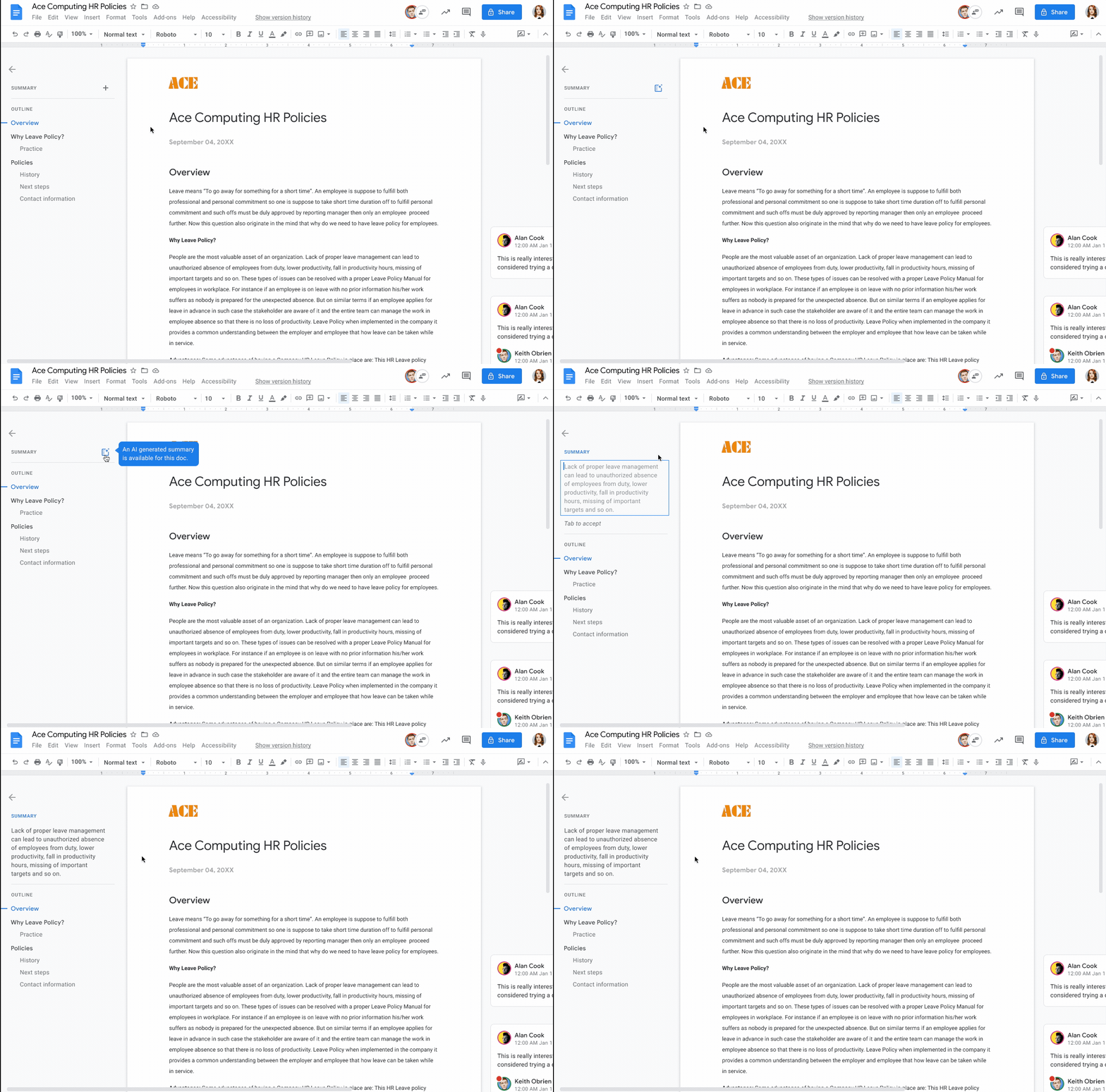
Staying on top of the vast amount of information that flows across our desks and phones can be a challenge. For documents, it’s difficult to know which ones are worth a deeper read or how to quickly grasp the highlights without fully reading through. That’s why we’re introducing automatically generated summaries in Docs that provide a brief overview of the main points in a document, so you can quickly parse the information that matters and prioritize where to focus. Built-in intelligence will suggest a summary for you, but you can also edit a summary manually. Summaries in Docs is launching today and will be generally available.
From our partners:
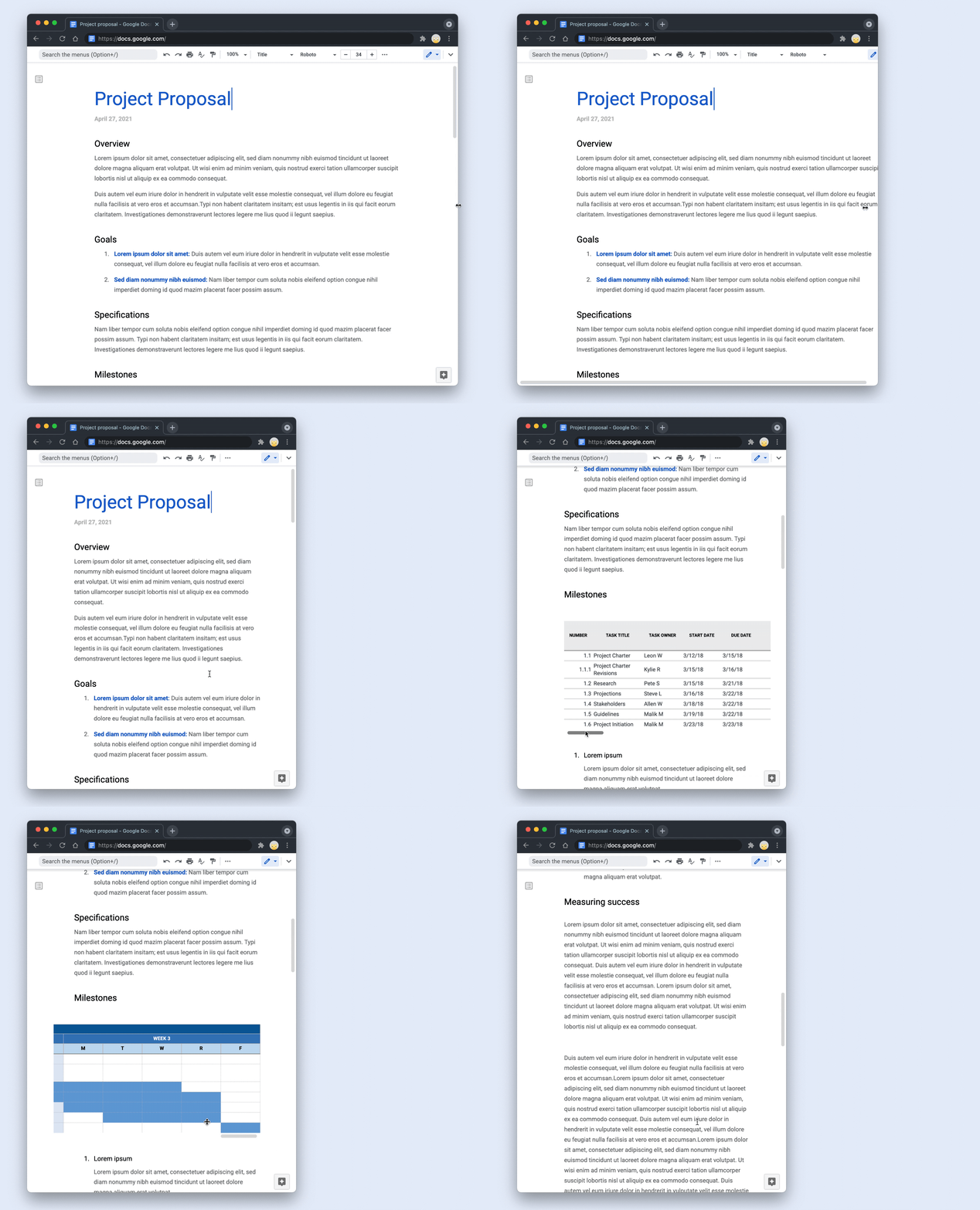
Our new ways of working demand tools that remove the confines of experiences designed for an era of individual work on office desktops. For example, the page breaks and margins in traditional document editor formats—designed to facilitate printing of physical documents—can make it difficult to collaborate on content elements that extend across a page. To address this, we’re launching pageless format in Docs, which lets you remove the boundaries of a page to create a surface that expands to the device or screen you’re using. With so many employees moving to hybrid work, with less need to print, pageless format makes it easier for teams to collaborate on documents with wide tables, large images, or detailed feedback in comments. And if you want to print or convert to PDF, you’ll be able to easily switch back to a paginated view. Pageless format in Docs rolls out today and will be generally available.
And because we designed Google Workspace to operate on our industry-leading cloud foundation, collaborating in Google Workspace provides encrypted and secure access to files, helping keep users safe and their information private.
Speed up workflows with interactive building blocks
With smart canvas, we’ve introduced interactive building blocks—like smart chips, templates, and checklists—that open up new, powerful collaboration capabilities. For example, it’s often helpful to see additional rich, context-setting information in a document—like a person’s location, title, and team information, instead of just their name. But, traditionally, finding that extra information has required multiple steps and context switching, like leaving the document to search for the person in a directory tool. With smart canvas, we make it simple to pull rich information directly into your document using @-mentions to insert smart chips for people, files, and meetings. We recently expanded the “@” menu, making it easy to insert additional things like images, tables, and templates. And we’re bringing this capability to a common scenario at work—collaborating with others on an email that will be sent out broadly. The current process is clunky, with collaborators crafting the email in a document editor, then manually porting it over to email. That’s why we’re making it easy to collaborate on an email draft in Docs with the new email draft template. When ready to send, simply click a button to export the content into a draft email in Gmail, with all the relevant fields automatically populated. Email draft templates will be rolling out in the coming weeks.
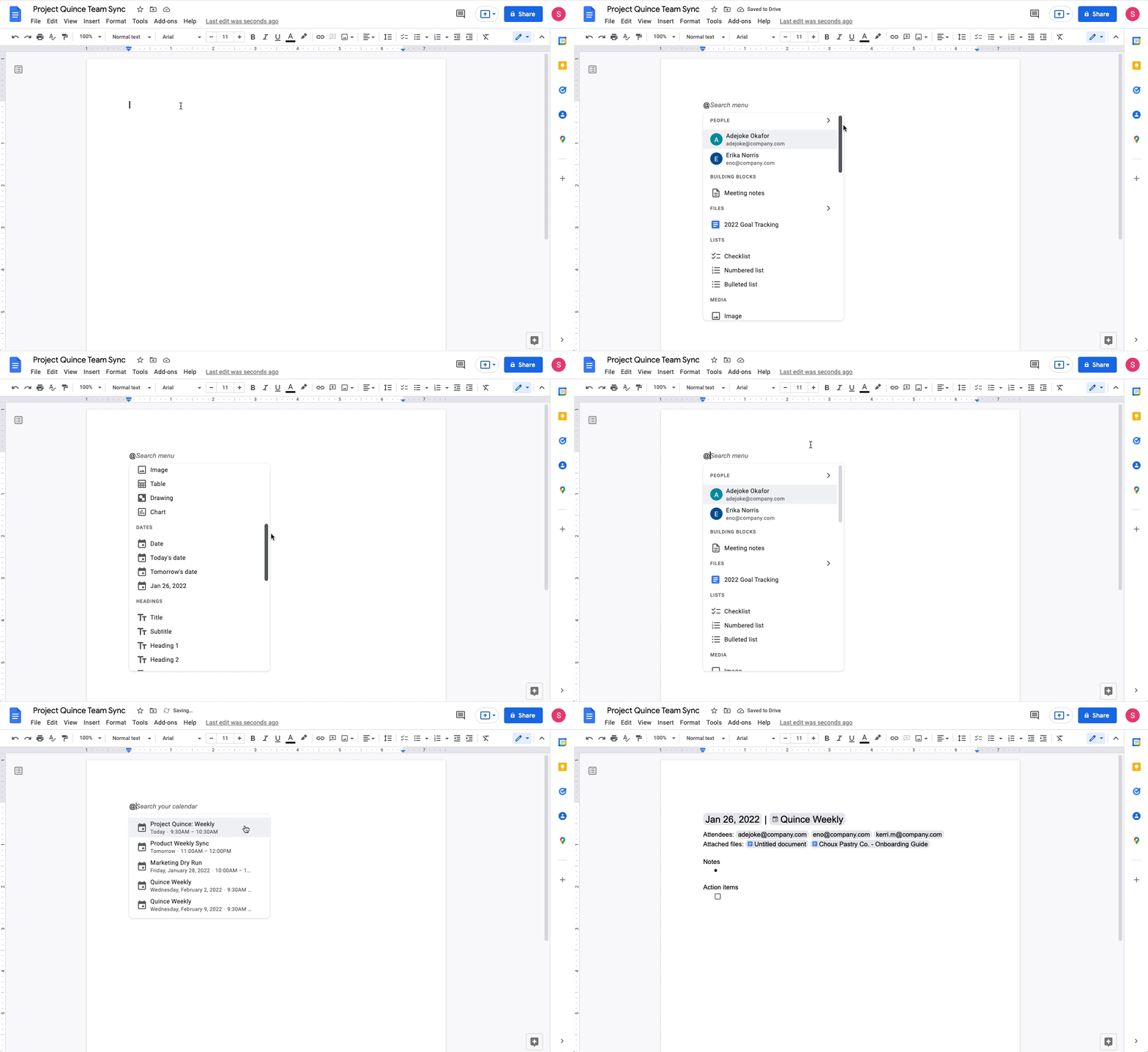
Similarly, we recently launched a meeting notes template that automatically imports any relevant information from a Calendar meeting invite, including smart chips for attendees and attached files—eliminating the manual steps traditionally required.
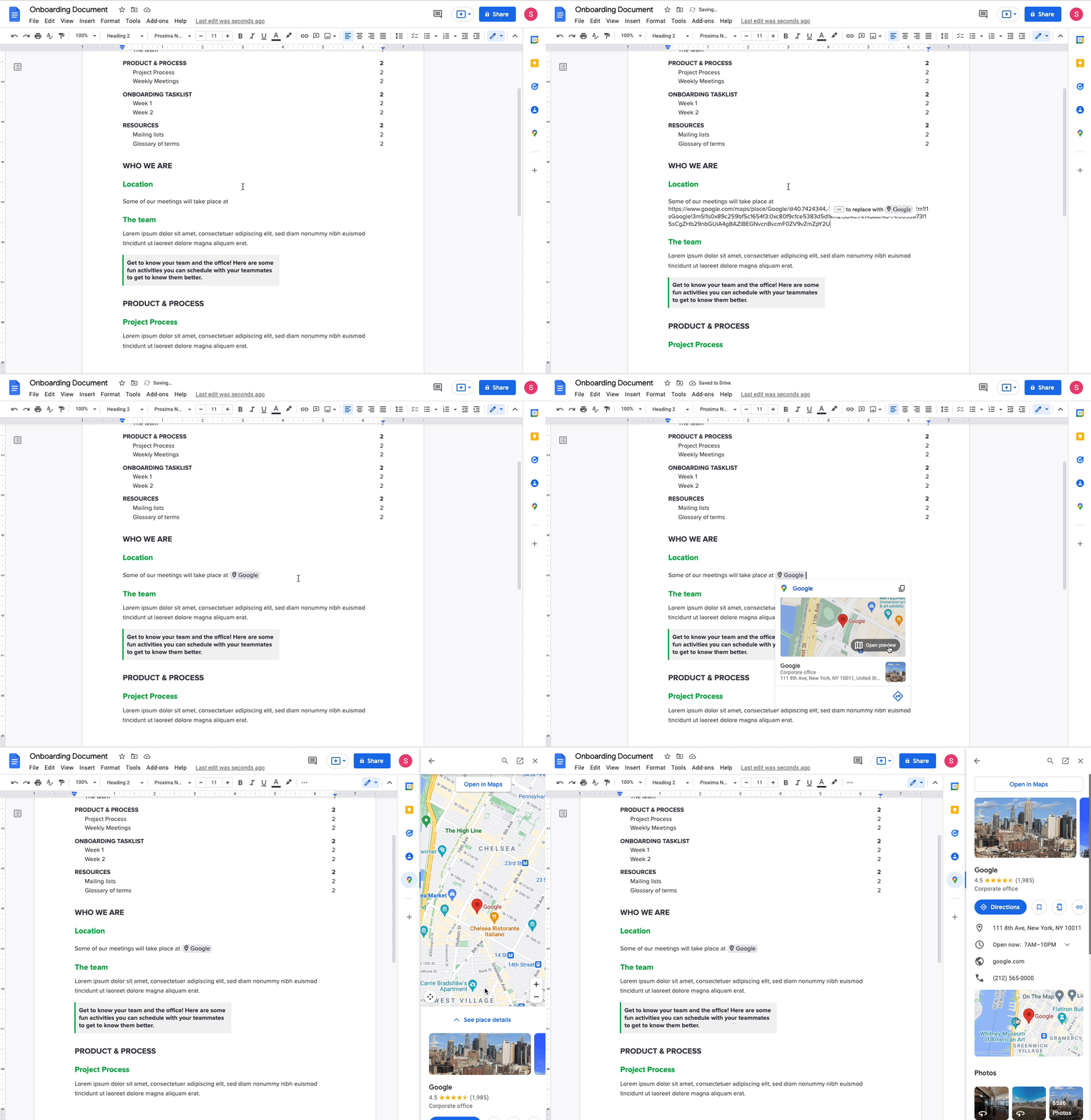
We’ve also launched additional smart chips, or clickable objects that pull relevant information directly into the collaboration canvas, helping you reduce context switching and build richer documents. With the new Maps smart chip, you can easily preview a Google Maps link directly in Docs. When you click on the smart chip, you’ll see a thumbnail with helpful information—like an image of the location in Maps and the address—or click the thumbnail to open a preview in the Docs side panel. We also recently launched people chips in Sheets, to help you quickly view helpful information like a person’s location, job title, and contact information.
Make data-driven decisions quickly
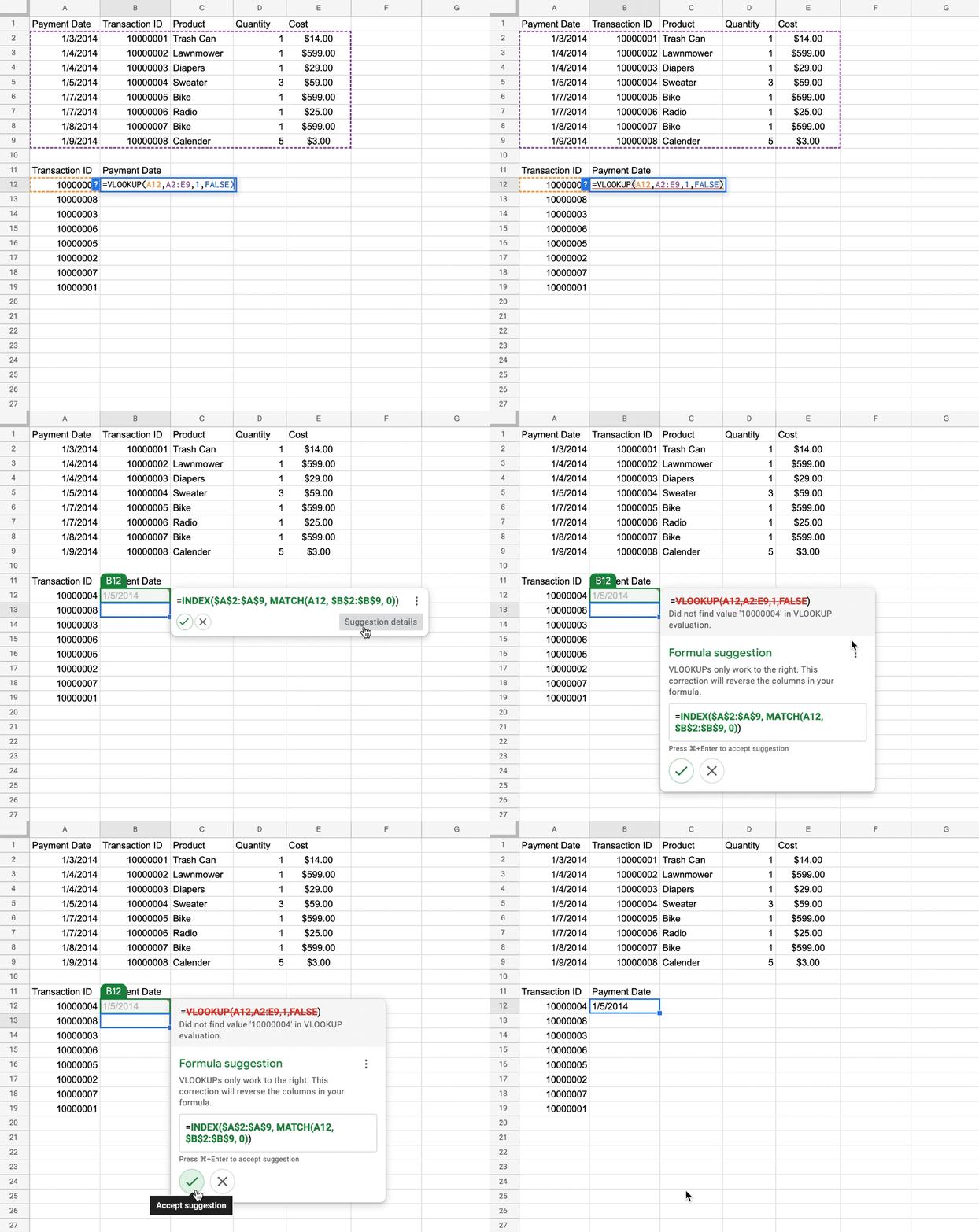
As businesses look to move faster, it’s increasingly important that all employees—not just data analysts—can quickly and easily make data-backed decisions. However, it’s not always easy to know what to analyze or quickly produce error-free results. That’s why we continue to infuse Sheets with intelligence, making it easier and faster for everyone to get insights from data. Last year, we launched formula suggestions, which intelligently recommend formulas and functions to use based on the data you are analyzing, and now, over 3 million formula suggestions are accepted each week. And soon, formula corrections will provide intelligent suggestions to help you troubleshoot formulas, catch errors, and deliver insights from your data faster. Formula corrections will be launching to general availability in the coming weeks.
Unlocking people-first collaboration
Supporting new ways of working has become a mandate for organizations across regions and industries—whether it’s for remote, hybrid, in-the-office, or frontline employees. They’re looking to adopt technologies that reduce the friction of people switching between countless tools and tabs to make collaboration happen. With smart canvas, we’re making it easier for people to stay connected where they’re already working together and enrich their collaboration with Google’s industry leading AI. And we’re continuing the vision that began when we first launched Docs and Sheets 16 years ago—to push beyond online documents toward collaborative experiences inspired by the web.
Start transforming collaboration at your organization with smart canvas. Sign up today for a Google Workspace free trial.
By: Vishnu Sivaji (Group Product Manager, Google Workspace – Collaboration)
Source: Google Cloud Blog
For enquiries, product placements, sponsorships, and collaborations, connect with us at [email protected]. We'd love to hear from you!
Our humans need coffee too! Your support is highly appreciated, thank you!