aster.cloud aster.cloud
  • /
  • Platforms
    • Public Cloud
    • On-Premise
    • Hybrid Cloud
    • Data
  • Architecture
    • Design
    • Solutions
    • Enterprise
  • Engineering
    • Automation
    • Software Engineering
    • Project Management
    • DevOps
  • Programming
    • Learning
  • Tools
  • About
  • /
  • Platforms
    • Public Cloud
    • On-Premise
    • Hybrid Cloud
    • Data
  • Architecture
    • Design
    • Solutions
    • Enterprise
  • Engineering
    • Automation
    • Software Engineering
    • Project Management
    • DevOps
  • Programming
    • Learning
  • Tools
  • About
aster.cloud aster.cloud
  • /
  • Platforms
    • Public Cloud
    • On-Premise
    • Hybrid Cloud
    • Data
  • Architecture
    • Design
    • Solutions
    • Enterprise
  • Engineering
    • Automation
    • Software Engineering
    • Project Management
    • DevOps
  • Programming
    • Learning
  • Tools
  • About
  • Technology

Apple Launches The First Driver’s License And State ID In Wallet With Arizona

  • aster.cloud
  • March 26, 2022
  • 3 minute read
Apple announced that Arizona is the first state to offer driver’s license and state ID in Wallet. Starting today, Arizonans can add their driver’s license or state ID to Wallet, and tap their iPhone or Apple Watch to seamlessly and securely present it at select TSA security checkpoints in Phoenix Sky Harbor International Airport.


“We’re thrilled to bring the first driver’s license and state ID in Wallet to Arizona today, and provide Arizonans with an easy, secure, and private way to present their ID when traveling, through just a tap of their iPhone or Apple Watch,” said Jennifer Bailey, Apple’s vice president of Apple Pay and Apple Wallet. “We look forward to working with many more states and the TSA to bring IDs in Wallet to users across the US.”


Partner with aster.cloud
for your next big idea.
Let us know here.


From our partners:

CITI.IO :: Business. Institutions. Society. Global Political Economy.
CYBERPOGO.COM :: For the Arts, Sciences, and Technology.
DADAHACKS.COM :: Parenting For The Rest Of Us.
ZEDISTA.COM :: Entertainment. Sports. Culture. Escape.
TAKUMAKU.COM :: For The Hearth And Home.
ASTER.CLOUD :: From The Cloud And Beyond.
LIWAIWAI.COM :: Intelligence, Inside and Outside.
GLOBALCLOUDPLATFORMS.COM :: For The World's Computing Needs.
FIREGULAMAN.COM :: For The Fire In The Belly Of The Coder.
ASTERCASTER.COM :: Supra Astra. Beyond The Stars.
BARTDAY.COM :: Prosperity For Everyone.

Additional states will offer driver’s license and state ID in Wallet soon. Colorado, Hawaii, Mississippi, Ohio, and the territory of Puerto Rico plan to bring this feature to their residents, along with the seven states Apple previously announced.
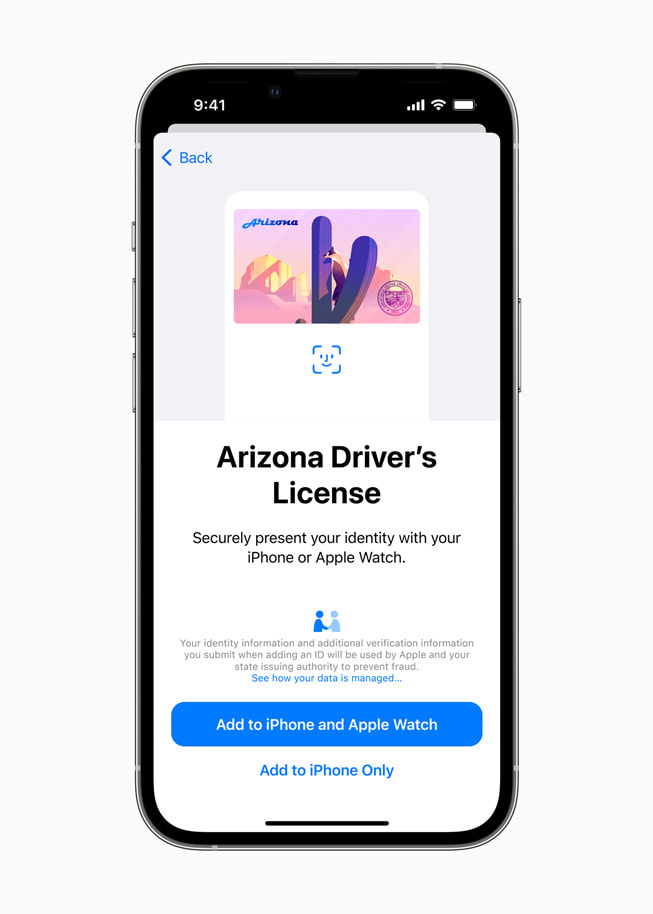
 

A user is walked through the process of adding their state driver’s license to Wallet using Face ID.
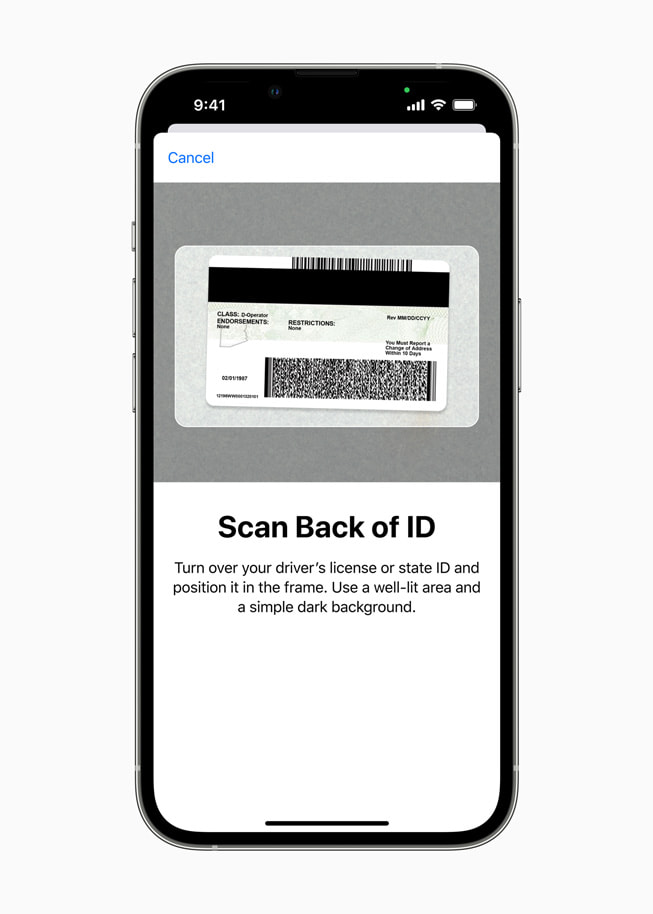
Users can seamlessly and securely add their driver’s license or state ID to Wallet by following the on-screen instructions on iPhone.

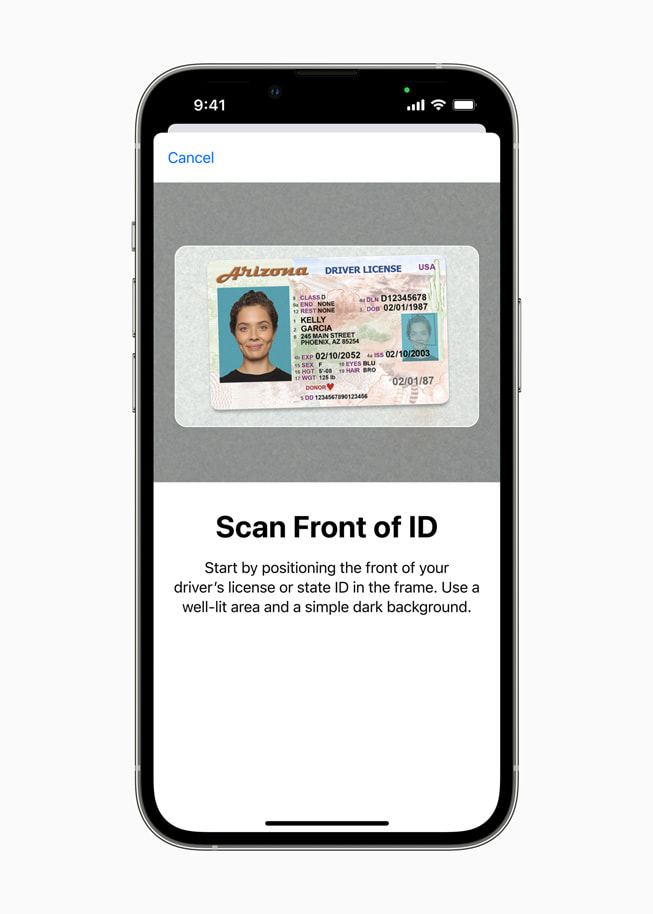
A user is prompted to scan the front of their driver’s license in Wallet.

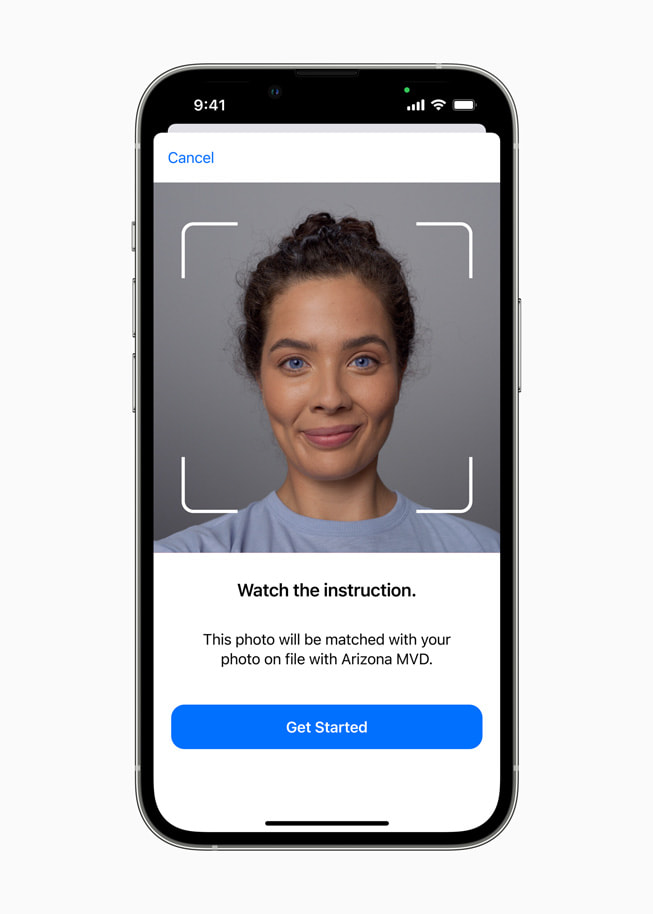
A user is walked through the Face ID process in Wallet.
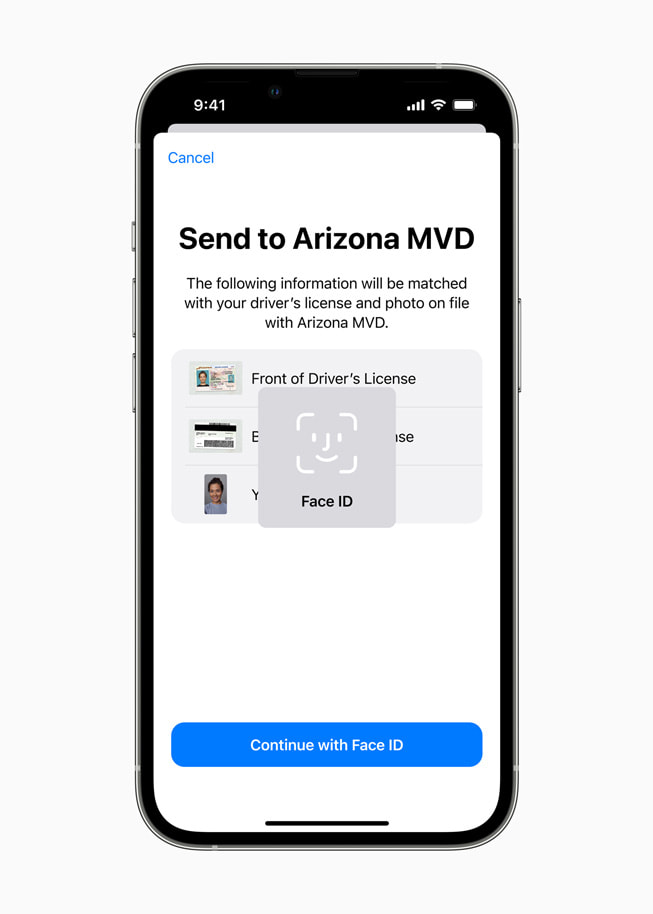
A user is walked through the process of submitting their photos and information to their local state agency using Face ID.
Adding a driver’s license or state ID to Wallet can be done in a few simple steps: Residents can tap the + button at the top of the screen in Wallet on their iPhone, select “Driver’s License or State ID,” and follow the on-screen instructions to start the setup and verification process. To help ensure that the person adding the identity card to Wallet is the same person to whom the identity card belongs, the user will be asked to take a selfie and scan the front and back of their driver’s license or state ID card, which will be securely provided to the issuing state for verification. As an additional fraud prevention step, users will also be prompted to complete a series of facial and head movements during the setup process. The state is responsible for verifying and approving the user’s request to add their driver’s license or state ID to Wallet.


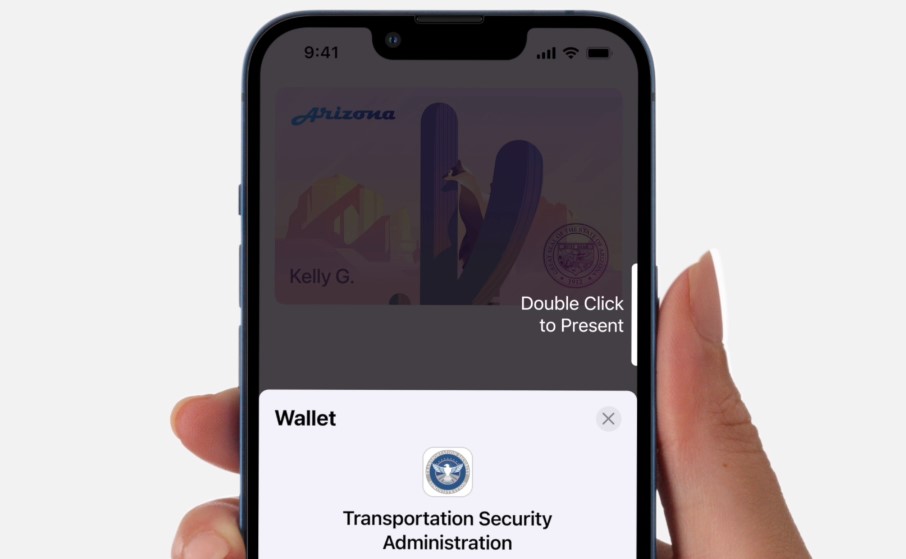
Once added to Wallet, users can present their driver’s license or state ID to the TSA at participating airport security checkpoints by simply tapping their iPhone or Apple Watch at the identity reader. On their iPhone or Apple Watch, users will be shown which information is requested by the TSA, and can consent to provide it with Face ID or Touch ID, without having to unlock their iPhone or show their ID card. All information is shared digitally, so users do not need to show or hand over their device to present their ID. The TSA will also capture a picture of the traveler for verification purposes.


Driver’s license and state ID in Wallet takes full advantage of the privacy and security built into iPhone and Apple Watch, and offers benefits that a physical ID card can’t match. Unlike physical ID cards, driver’s license and state ID in Wallet presents only the information needed for the interaction, and the user has the opportunity to review and authorize the information being requested before it is shared. Additionally, driver’s license and state ID in Wallet is presented digitally through encrypted communication directly between the device and the identity reader, so users do not need to show or hand over their device. Biometric authentication using Face ID and Touch ID helps ensure that only the person who added the ID to the device can view or present their ID or license in Wallet. If users lose their iPhone or Apple Watch, they can use the Find My app to easily lock their device and help locate it, or remotely erase their device.


Driver’s license and state ID in Wallet is available on iPhone 8 or later running iOS 15.4, and Apple Watch Series 4 or later running watchOS 8.4 or later. Driver’s licenses and state IDs in Wallet are currently available for use in select states at select TSA checkpoints. Travelers should refer to TSA checkpoint signage to confirm availability.


More information about driver’s license and state ID in Wallet is available on apple.co/wallet-id.
Read More  Intel Advances vRAN, Launches Xeon For Network And Edge, And Enhances Edge Software

For enquiries, product placements, sponsorships, and collaborations, connect with us at [email protected]. We'd love to hear from you!

Our humans need coffee too! Your support is highly appreciated, thank you!

aster.cloud

Related Topics
  • Apple
  • Driver’s License
  • State ID
  • Wallet
You May Also Like
View Post
  • Technology

The AI investment surge hasn’t produced the expected results yet. That could change in 2026

  • June 26, 2026
zedreviews-valerion
View Post
  • Gears
  • Technology

Father’s Day Outdoors – Build Dad the Ultimate Backyard Watch Party

  • June 20, 2026
zedreviews-fathers-day-50830
View Post
  • Gears
  • Technology
  • Tools

Father’s Day Outdoors, Round Two – Gear for the Action, the Tailgate, and Beating the Heat

  • June 20, 2026
zedreviews-fathers-day-2147684744
View Post
  • Gears
  • Technology
  • Tools

The Ultimate Father’s Day Gift Guide – Home Entertainment Upgrades Dad Actually Wants

  • June 20, 2026
zedreviews-fathers-day-21306
View Post
  • Gears
  • Technology

A Father’s Day Gift Guide for Every Dad – Timepieces and Travel Gear

  • June 20, 2026
View Post
  • Gears
  • Technology

Samsung Art Store Brings Art Basel to Homes Worldwide With New Curated Collection

  • June 15, 2026
View Post
  • Technology

The consequences of relying on AI for accurate news

  • June 10, 2026
View Post
  • Gears
  • Technology

WWDC26: Apple unveils next generation of Apple Intelligence, Siri AI, powerful parental controls, and an expansive set of software improvements

  • June 8, 2026

Stay Connected!
LATEST
  • 1
    The Fastest AI Fried Chicken In The World
    • June 29, 2026
  • 2
    Zed Approves | How to Stay Cool in Extreme Heat
    • June 29, 2026
  • 3
    The AI investment surge hasn’t produced the expected results yet. That could change in 2026
    • June 26, 2026
  • 4
    Zed Approves | It’s Prime Day 2026! Time to Upgrade Your World Cup Viewing Setup and Beat the Heat
    • June 25, 2026
  • 5
    Zed Approves | The Best Prime Day PC Deals: Top Gaming Rigs, Workstations, and Everyday Laptops
    • June 24, 2026
  • neon-cart 6
    Zed Approves: How to Gear Up for GTA 6 This Amazon Prime Day (2026 Quick Guide)
    • June 22, 2026
  • zedreviews-valerion 7
    Father’s Day Outdoors – Build Dad the Ultimate Backyard Watch Party
    • June 20, 2026
  • zedreviews-fathers-day-50830 8
    Father’s Day Outdoors, Round Two – Gear for the Action, the Tailgate, and Beating the Heat
    • June 20, 2026
  • zedreviews-fathers-day-2147684744 9
    The Ultimate Father’s Day Gift Guide – Home Entertainment Upgrades Dad Actually Wants
    • June 20, 2026
  • zedreviews-fathers-day-21306 10
    A Father’s Day Gift Guide for Every Dad – Timepieces and Travel Gear
    • June 20, 2026
about
Hello World!

We are aster.cloud. We’re created by programmers for programmers.

Our site aims to provide guides, programming tips, reviews, and interesting materials for tech people and those who want to learn in general.

We would like to hear from you.

If you have any feedback, enquiries, or sponsorship request, kindly reach out to us at:

[email protected]
Most Popular
  • 1
    The Many Roles of a Father: More Than Just a Parent
    • June 20, 2026
  • 2
    The Practical Guide to a Father’s Traits and the Gifts They Actually Want
    • June 20, 2026
  • 3
    Expectations vs. Reality: The AI We Thought We’d Have in 10 Years
    • June 19, 2026
  • digital-nomad-freelancer-worker-2151205464 4
    One paperwork problem – Get your Digital Nomad Visa employment documents fast from UK, EU or Singapore
    • June 16, 2026
  • 5
    Samsung Art Store Brings Art Basel to Homes Worldwide With New Curated Collection
    • June 15, 2026
  • /
  • Technology
  • Tools
  • About
  • Contact Us

Input your search keywords and press Enter.