Apache Spark has become a popular platform as it can serve all of data engineering, data exploration, and machine learning use cases. However, Spark still requires the on-premises way of managing clusters and tuning infrastructure for each job. This increases costs, reduces agility, and makes governance extremely hard; prohibiting enterprises from making insights available to the right users at the right time.Dataproc Serverless lets you run Spark batch workloads without requiring you to provision and manage your own cluster. Specify workload parameters, and then submit the workload to the Dataproc Serverless service. The service will run the workload on a managed compute infrastructure, autoscaling resources as needed. Dataproc Serverless charges apply only to the time when the workload is executing.
You can run the following Spark workload types on the Dataproc Serverless for Spark service:
From our partners:
- Pyspark
- Spark SQL
- Spark R
- Spark Java/Scala
This post walks you through the process of ingesting files into BigQuery using serverless service such as Cloud Functions, Pub/Sub & Serverless Spark. We use Daily Shelter Occupancy data in this example.
You can find the complete source code for this solution within our Github.
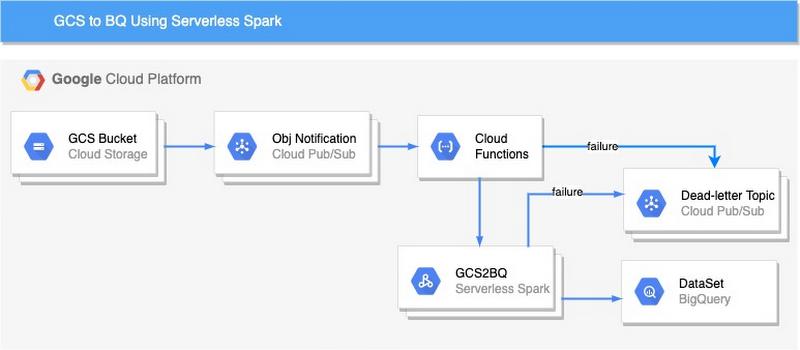
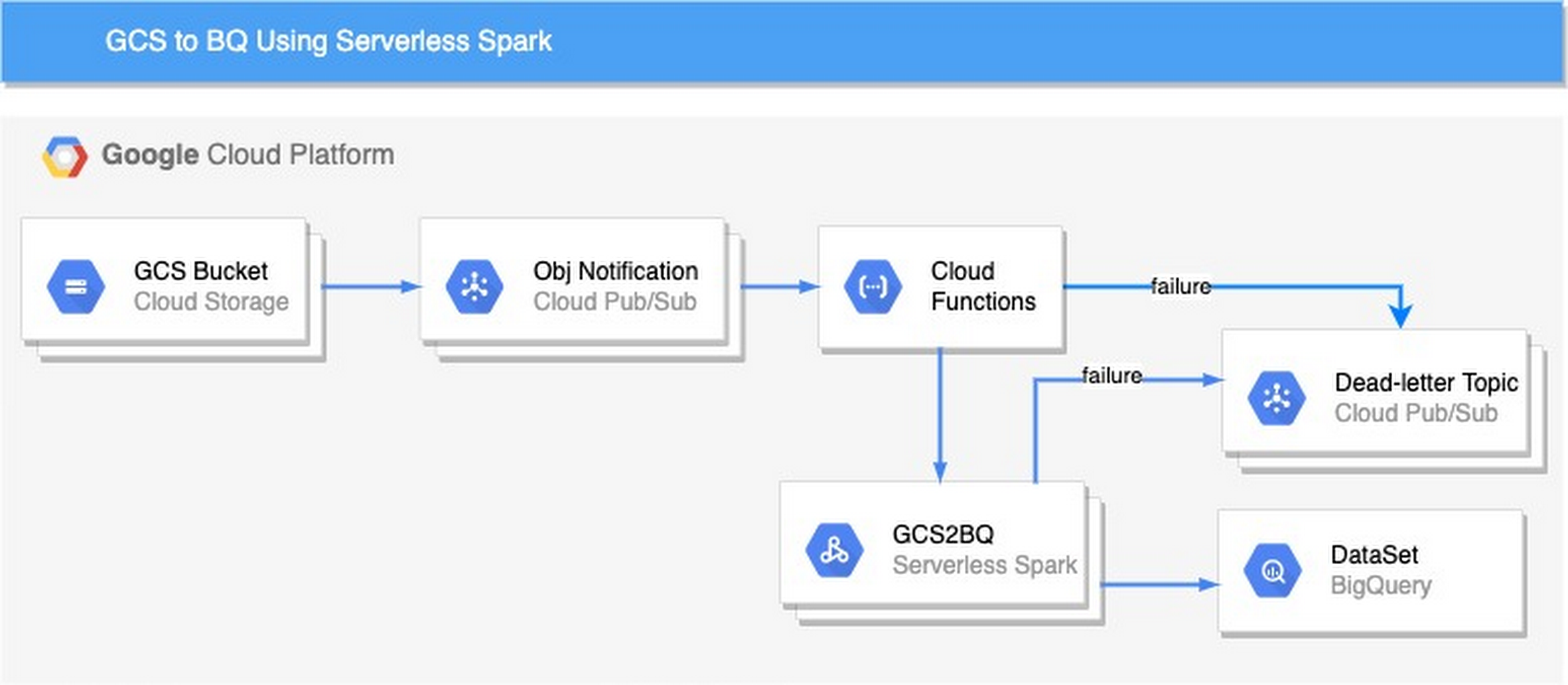
Here’s a look at the architecture we’ll be using:
Here’s how to get started with ingesting GCS files to BigQuery using Cloud Functions and Serverless Spark:
1. Create a bucket, the bucket holds the data to be ingested in GCP. Once the object is upload in a bucket, the notification is created in Pub/Sub topic
PROJECT_ID=<<project_id>>GCS_BUCKET_NAME=<<Bucket name>>gsutil mb gs://${GCS_BUCKET_NAME}gsutil notification create \-t projects/${PROJECT_ID}/topics/create_notification_${GCS_BUCKET_NAME} \-e OBJECT_FINALIZE \-f json gs://${GCS_BUCKET_NAME}
2. Build and copy the jar to a GCS bucket(Create a GCS bucket to store the jar if you don’t have one).
Follow the steps to create a GCS bucket and copy JAR to the same.
GCS_ARTIFACT_REPO=<<artifact repo name>>gsutil mb gs://${GCS_ARTIFACT_REPO}cd gcs2bq-sparkmvn clean installgsutil cp target/GCS2BQWithSpark-1.0-SNAPSHOT.jar gs://${GCS_ARTIFACT_REPO}/
3. Enable network configuration required to run serverless spark
- Open subnet connectivity: The subnet must allow subnet communication on all ports. The following gcloud command attaches a network firewall to a subnet that allows ingress communications using all protocols on all ports if the source and destination are tagged with “serverless-spark”
gcloud compute firewall-rules create allow-internal-ingress \--network="default" \--source-tags="serverless-spark" \--target-tags="serverless-spark" \--direction="ingress" \--action="allow" \--rules="all"
Note: The default VPC network in a project with the default-allow-internal firewall rule, which allows ingress communication on all ports (tcp:0-65535, udp:0-65535, and icmp protocols:ports), meets this requirement. However, it also allows ingress by any VM instance on the network
- Private Google Access: The subnet must have Private Google Access enabled. External network access. Drivers and executors have internal IP addresses. You can set up Cloud NAT to allow outbound traffic using internal IPs on your VPC network.
4. Create necessary GCP resources required by Serverless Spark
- Create BQ Dataset Create a dataset to load csv files.
DATASET_NAME=<<dataset_name>>bq --location=US mk -d \--default_table_expiration 3600 \${DATASET_NAME}
- Create BQ table Create a table using the schema in schema/schema.json
TABLE_NAME=<<table_name>>bq mk --table ${PROJECT_ID}:${DATASET_NAME}.${TABLE_NAME} \./schema/schema.json
- Create service account and permission required to read from GCS bucket and write to BigQuery table
SERVICE_ACCOUNT_ID="gcs-to-bq-sa"gcloud iam service-accounts create ${SERVICE_ACCOUNT_ID} \--description="GCS to BQ service account for Serverless Spark" \--display-name="GCS2BQ-SA"roles=("roles/dataproc.worker" "roles/bigquery.dataEditor" "roles/bigquery.jobUser" "roles/storage.objectViewer")for role in ${roles[@]}; dogcloud projects add-iam-policy-binding ${PROJECT_ID} \--member="serviceAccount:${SERVICE_ACCOUNT_ID}@${PROJECT_ID}.iam.gserviceaccount.com" \--role="$role"done
- Create GCS bucket to load data to BigQuery
GCS_TEMP_BUCKET=<<temp_bucket>>gsutil mb gs://${GCS_TEMP_BUCKET}
- Create Dead Letter Topic and Subscription
ERROR_TOPIC=err_gcs2bq_${GCS_BUCKET_NAME}gcloud pubsub topics create $ERROR_TOPICgcloud pubsub subscriptions create err_sub_${GCS_BUCKET_NAME}} \--topic=${ERROR_TOPIC}
Note: Once all resources are created, change the variables value () in trigger-serverless-spark-fxn/main.py from line 27 to 31. The code of the function is in Github
5. Deploy the cloud function.
The cloud function is triggered once the object is copied to the bucket. The cloud function triggers the Servereless spark which loads data into Bigquery.
cd trigger-serverless-spark-fxngcloud functions deploy trigger-serverless-spark-fxn --entry-point \invoke_sreverless_spark --runtime python37 \--trigger-resource ${GCS_BUCKET_NAME}_create_notification \--trigger-event google.pubsub.topic.publish
6. Invoke end to end pipeline
Invoke the end-to-end pipeline by Downloading 2020 Daily Center Data and uploading to the GCS bucket(GCS_BUCKET_NAME).(Note: replace with the bucket name created in Step-1)
Debugging Pipelines
Error messages for the failed data pipelines are published to Pub/Sub topic (ERROR_TOPIC) created in Step 4 (Create Dead Letter Topic and Subscription). The errors from both cloud function and spark are forwarded to Pub/Sub. Pub/Sub topics might have multiple entries for the same data-pipeline instance. Messages in Pub/Sub topics can be filtered using the “oid” attribute. The attribute(oid) is unique for each pipeline run and holds a full object name with the generation id.
Conclusion
In this post, we’ve shown you how to ingest GCS files to BigQuery using Cloud Functions and Serverless Spark. Register interest here to request early access to the new solutions for Spark on Google Cloud.
By: Swati Sindwani (Big Data and Analytics Cloud Consultant) and Bipin Upadhyaya (Strategic Cloud Engineer)
Source: Google Cloud Blog
For enquiries, product placements, sponsorships, and collaborations, connect with us at [email protected]. We'd love to hear from you!
Our humans need coffee too! Your support is highly appreciated, thank you!