Organizations on a journey to containerize applications and run them on Kubernetes often reach a point where running a single cluster doesn’t meet their needs. One example, you want to bring your app closer to the users in a new regional market. Add a cluster to the new region and get the added benefit of increasing resiliency. Please read this multi-cluster use cases overview if you want to learn more about the benefits and tradeoffs involved.
ArgoCD and Fleets offer a great way to ease the management of multi-cluster environments by allowing you to define your clusters state based on labels abstracting away the focus from unique clusters to profiles of clusters that are easily replaced.
From our partners:
This post shows you how to use ArgoCD and Argo Rollouts to automate the state of a Fleet of GKE clusters. This demo covers three potential journeys for a cluster operator.
- Add a new application cluster to the Fleet with zero touch beyond deploying the cluster and giving it a specific label. The new cluster should automatically install a baseline set of configurations for tooling and security along with any applications tied to the cluster label.
- Deploy a new application to the Fleet that automatically inherits baseline multi-tenant configurations for the team that develops and delivers the application, and applies Kubernetes RBAC policies to that team’s Identity Group.
- Progressively roll out a new version of an application across groups, or waves, of clusters with manual approval needed in between each wave.
You can find the code used in this demo on GitHub.
Configuring the ArgoCD Fleet Architecture
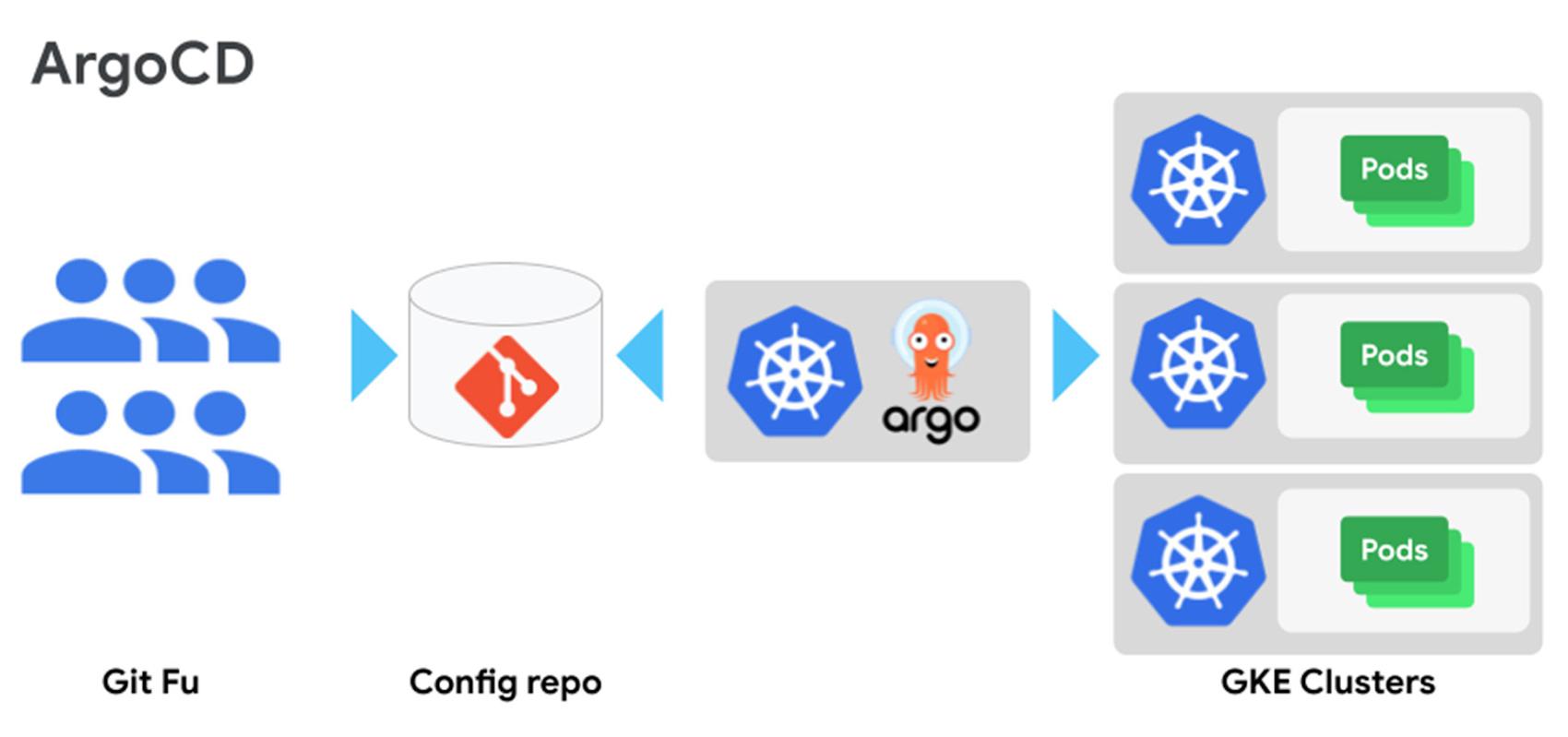
ArgoCD is a CNCF tool that provides GitOps continuous delivery for Kubernetes. ArgoCD’s UX/UI is one of its most valuable features. To preserve the UI/UX across a Fleet of clusters, use a hub and spoke architecture. In a hub and spoke design, you use a centralized GKE cluster to host ArgoCD (the ArgoCD cluster). You then add every GKE cluster that hosts applications as a Secret to the ArgoCD namespace in the ArgoCD cluster. You assign specific labels to each application cluster to identify it. ArgoCD config repo objects are created for each Git repository containing Kubernetes configuration needed for your Fleet. ArgoCD’s sync agent continuously watches the config repo(s) defined in the ArgoCD applications and actuates those changes across the Fleet of application clusters based on the cluster labels that are in that cluster’s Secret in the ArgoCD namespace.

Set up the underlying infrastructure
Before you start working with your application clusters, you need some foundational infrastructure. Follow the instructions in Fleet infra setup, which uses a Google-provided demo tool to set up your VPC, regional subnets, Pod and Service IP address ranges, and other underlying infrastructure. These steps also create the centralized ArgoCD cluster that’ll act as your control cluster.
Configure the ArgoCD cluster
With the infrastructure set up, you can configure the centralized ArgoCD cluster with Managed Anthos Service Mesh (ASM), Multi Cluster Ingress (MCI), and other controlling components. Let’s take a moment to talk about why ASM and MCI are so important to your Fleet.
MCI is going to provide better performance to all traffic getting routing into your cluster from an external client by giving you a single anycast IP in front of a global layer 7 load balancer that routes traffic to the GKE cluster in your Fleet that is closest to your clients. MCI also provides resiliency to regional failure. If your application is unreachable in the region closest to a client, they will be routed to the next closest region.
Along with mTLS, layer 7 metrics for you apps, and a few other great features, ASM is going to provide you with a network that handles pod to pod traffic across your Fleet of GKE clusters. This means that your applications making calls to other applications within the cluster an automatically redirect to other cluster in your Fleet if the local call fails or has not endpoints.
Follow the instructions in Fleet cluster setup. The command runs a script that installs ArgoCD, creates ApplicationSets for application cluster tooling and configuration, and logs you into ArgoCD. It also configures ArgoCD to synchronize with a private repository on GitHub.
When you add a GKE application cluster as a Secret to the ArgoCD namespace, and give it the label `env: “multi-cluster-controller”`, the multi-cluster-controller ApplicationSet generates applications based on the subdirectories and files in the multi-cluster-controllers folder. For this demo, the folder contains all of the config necessary to setup Multi Cluster Ingress for the ASM Ingress Gateways that will be installed in each application cluster.
When you add a GKE application cluster as a Secret to the ArgoCD namespace, and give it the label `env: “prod”`, the app-clusters-tooling application set generates applications for each subfolder in the app-clusters-config folder. For this demo, the app-clusters-config folder contains tooling needed for each application cluster. For example, the argo-rollouts folder contains the Argo Rollouts custom resource definitions that need to be installed across all application clusters.
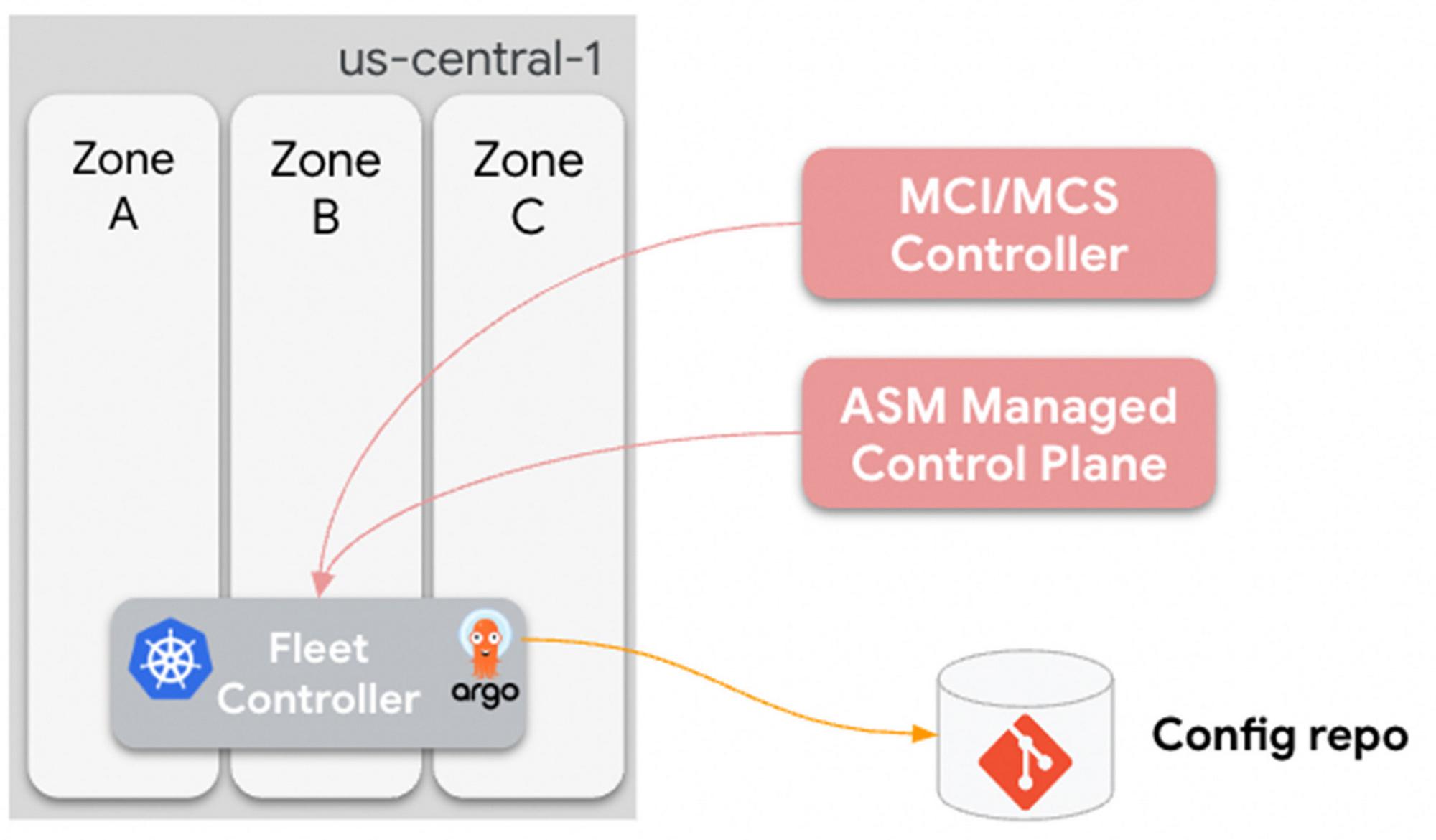
At this point, you have the following:
- Centralized ArgoCD cluster that syncs to a GitHub repository.
- Multi Cluster Ingress and multi cluster service objects that sync with the ArgoCD cluster.
- Multi Cluster Ingress and multi cluster Service controllers that configure the Google Cloud Load Balancer for each application cluster. The load balancer is only installed when the first application cluster gets added to the Fleet.
- Managed Anthos Service Mesh that watches Istio endpoints and objects across the Fleet and keeps Istio sidecars and Gateway objects updated.
The following diagram summarizes this status:

Connect an application cluster to the Fleet
With the ArgoCD control cluster set up, you can create and promote new clusters to the Fleet. These clusters run your applications. In the previous step, you configured multi-cluster networking with Multi Cluster Ingress and Anthos Service Mesh. Adding a new cluster to the ArgoCD cluster as a Secret with the label `env=prod` ensures that the new cluster automatically gets the baseline tooling it needs, such as Anthos Service Mesh Gateways.
To add any new cluster to ArgoCD, you add a Secret to the ArgoCD namespace in the control cluster. You can do this using the following methods:
- The `argocli add cluster` command, which automatically inserts a bearer token into the Secret that grants the control cluster `clusteradmin` permissions on the new application cluster.
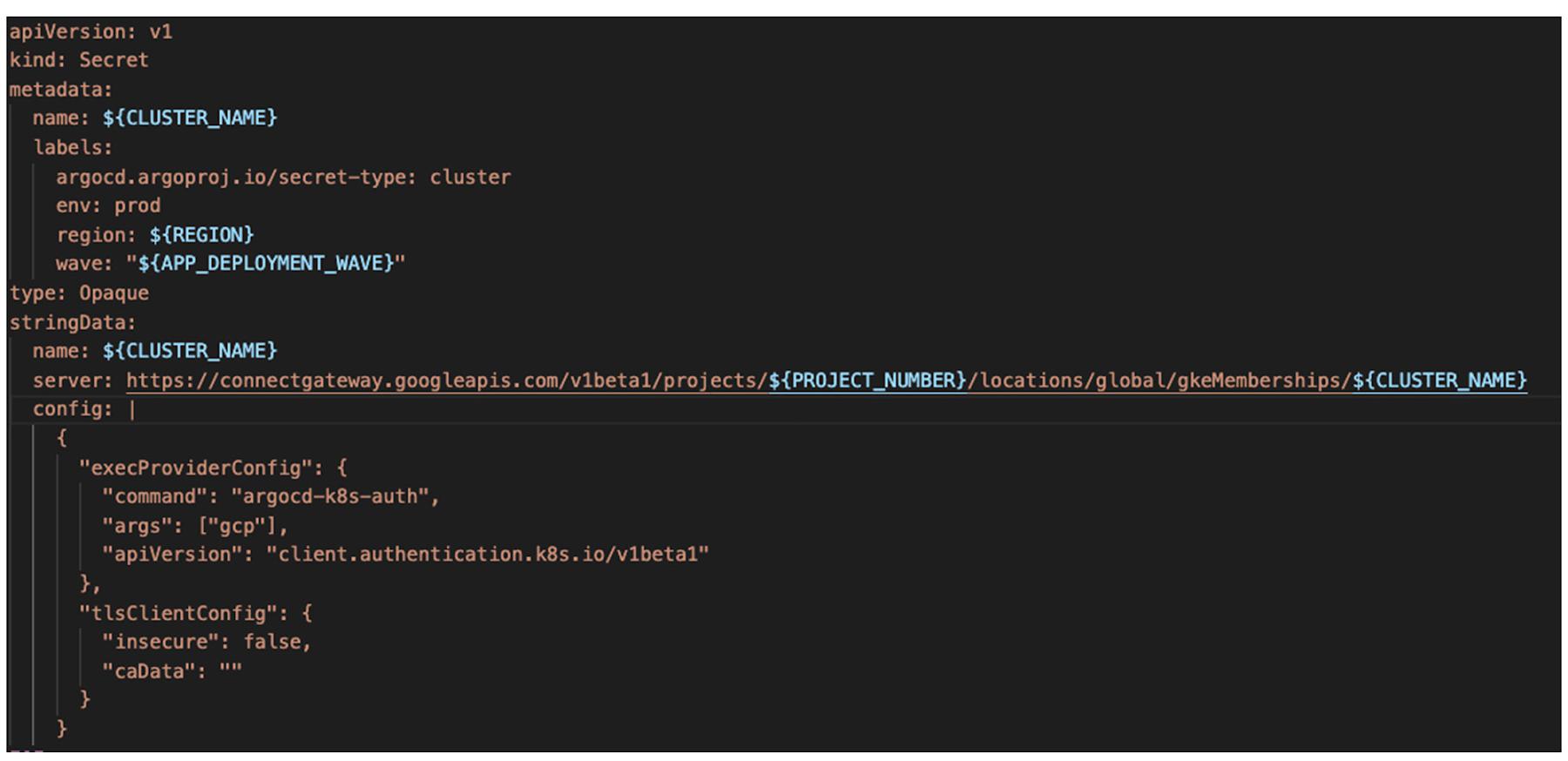
- Connect Gateway and Fleet Workload Identity, which let you construct a Secret that has custom labels, such as labels to tell your ApplicationSets what to do, and configure ArgoCD to use a Google OAuth2 token to make authenticated API calls to the GKE control plane.
When you add a new cluster to ArgoCD, you can also mark it as being part of a specific rollout wave, which you can leverage when you start progressive rollouts later in the demo.
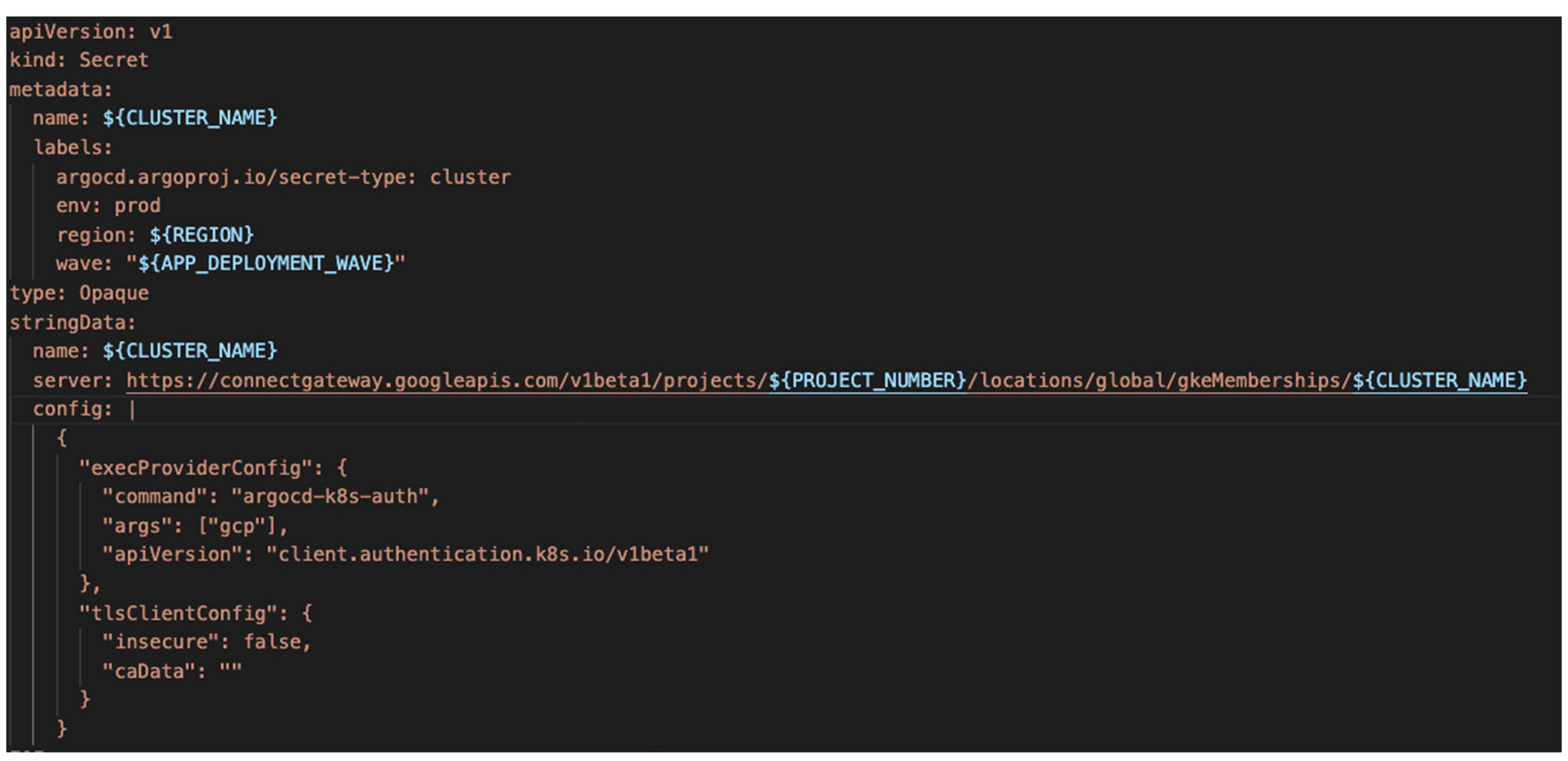
The following example Secret manifest shows a Connect Gateway authentication configuration and labels such as `env: prod` and `wave`:
For the demo, you can use a Google-provided script to add an application cluster to your ArgoCD configuration. For instructions, refer to Promoting Application Clusters to the Fleet.
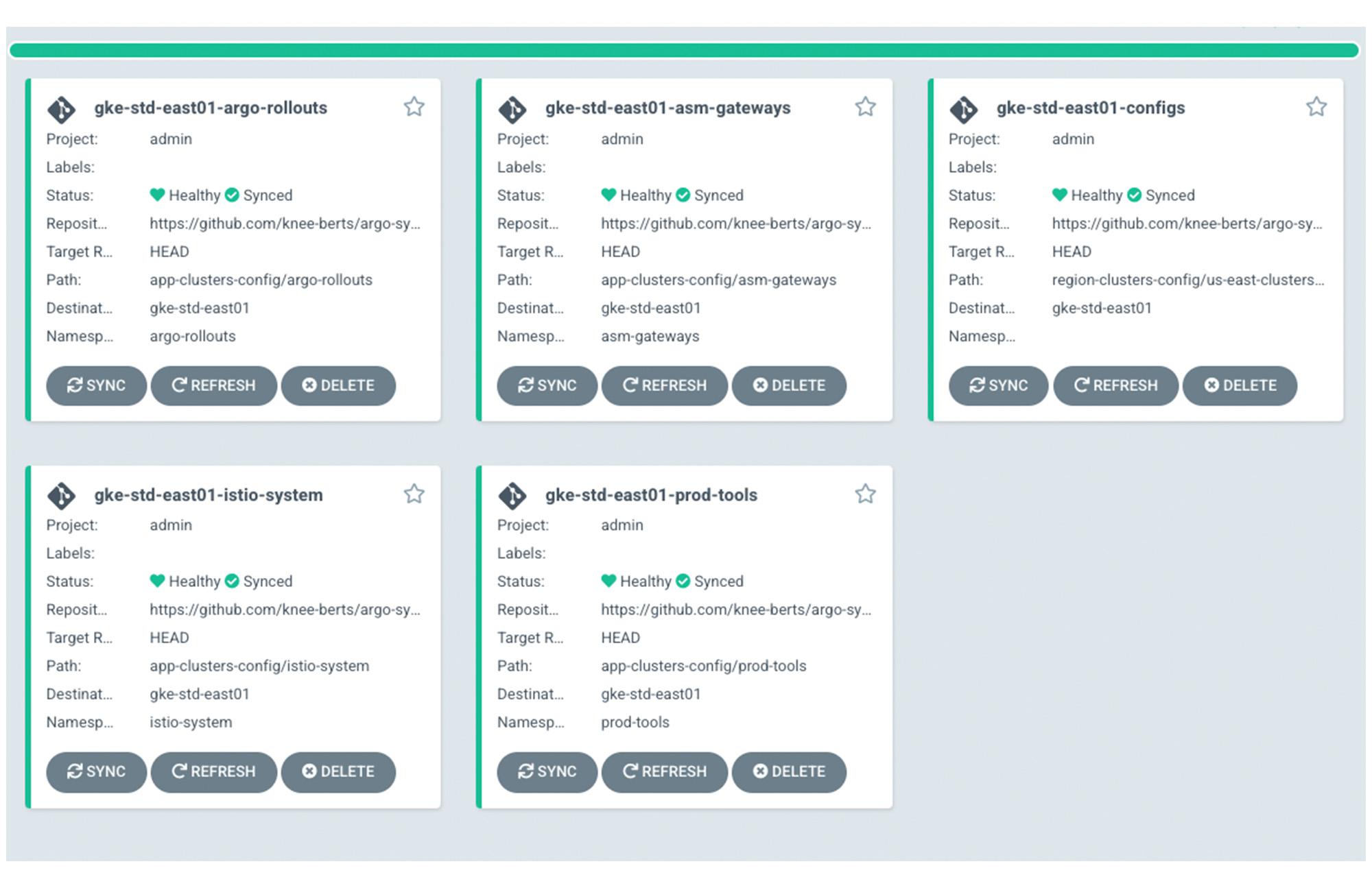
You can use the ArgoCD web interface to see the progress of the automated tooling setup in the clusters, such as in the following example image:

Add a new team application and a new cluster
At this point, you have an application cluster in the Fleet that’s ready to serve apps. To deploy an app to the cluster, you create the application configurations and push them to the ArgoCD config repository. ArgoCD notices the push and automatically deploys and configures the application to start serving traffic through the Anthos Service Mesh Gateway.
For this demo, you can run a Google-provided script that creates a new application based on a template, in a new ArgoCD Team, `team-2`. For instructions, refer to Creating a new app from the app template.
The new application creation also configures an application set for each progressive rollout wave, synced with a git branch for that wave.
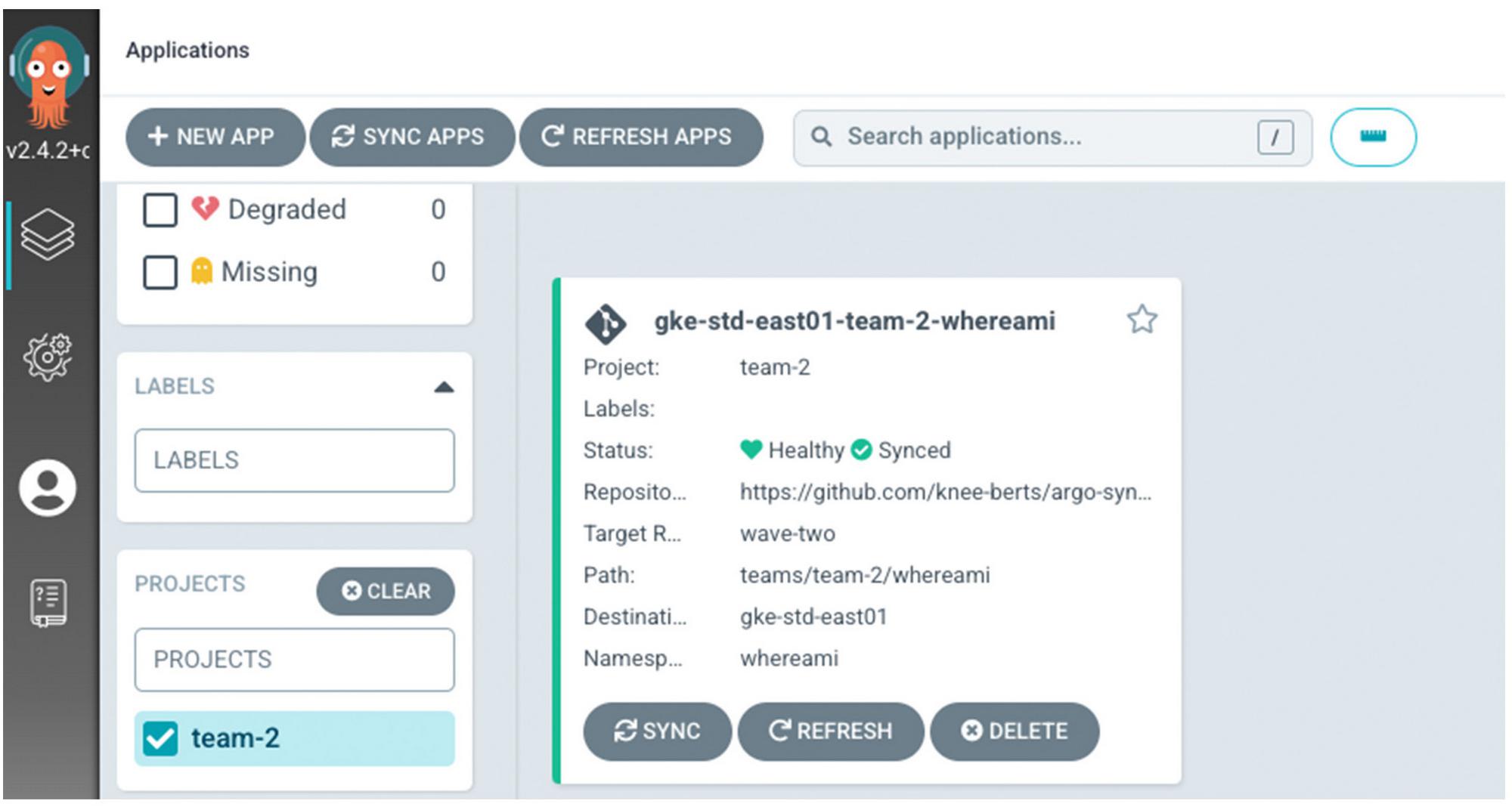
Since that application cluster is labeled as wave one and is the only application cluster deployed so far, you should only see one Argo application in the UI for the app that looks similar to this.

If you `curl` the endpoint, the app responds with some metadata including the name of the Google Cloud zone in which it’s running:
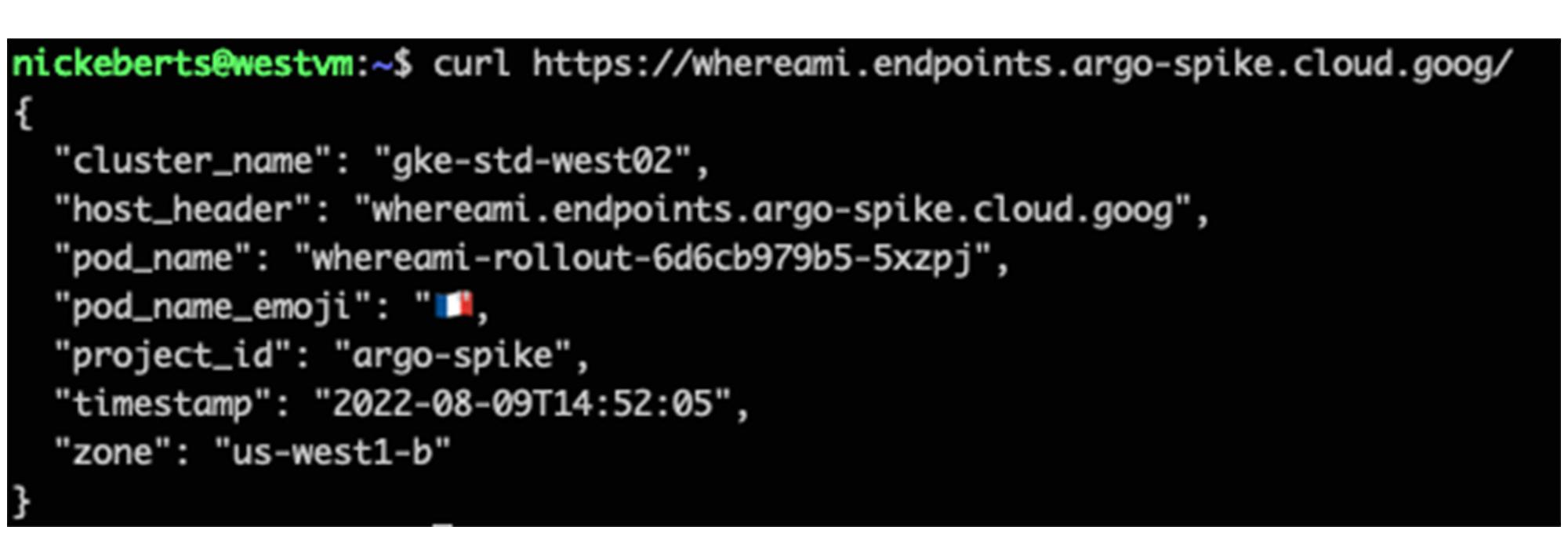
You can also add a new application cluster in a different Google Cloud zone, for higher availability. To do so, you create the cluster in the same VPC and add a new ArgoCD Secret with labels that match the existing ApplicationSets.
For this demo, you can use a Google-provided script to do the following:
- Add a new cluster in a different zone
- Label the new cluster for wave two (the existing application cluster is labeled for wave one)
- Add the application-specific labels so that ArgoCD installs the baseline tooling
- Deploys another instance of the sample application in that cluster
For instructions, refer to Add another application cluster to the Fleet. After you run the script, you can check the ArgoCD web interface for the new cluster and application instance. The interface is similar to this:
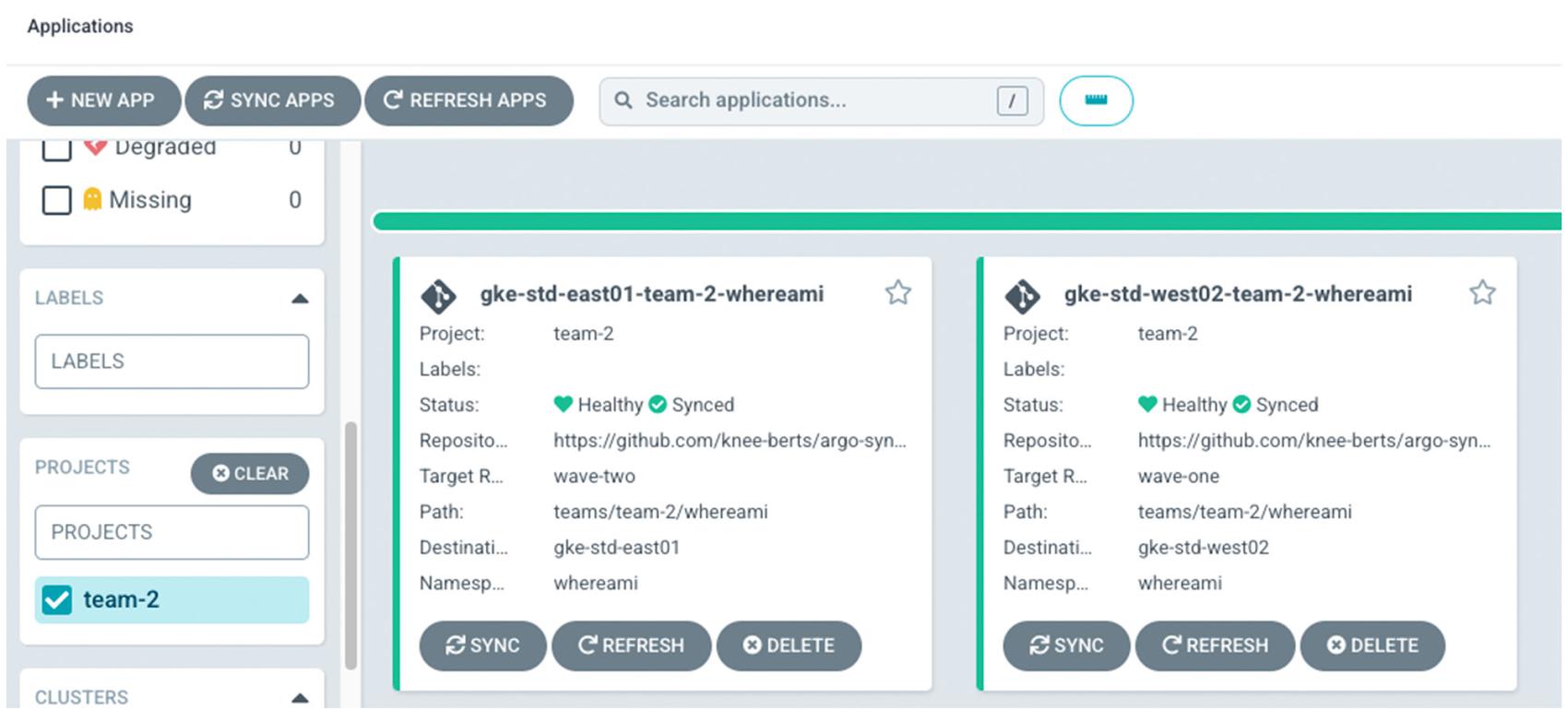

If you `curl` the application endpoint, the GKE cluster with the least latent path from the source of the curl serves the response. For example, curling from a Compute Engine instance in `us-west1` routes you to the `gke-std-west02` cluster.
You can experiment with the latency-based routing by accessing the endpoint from machines in different geographical locations.
At this point in the demo, you have the following:
- One application cluster labeled for wave one
- One application cluster labeled for wave two
- A single Team with an app deployed on both application clusters
- A control cluster with ArgoCD
- A backing configuration repository for you to push new changes
Progressively rollout apps across the Fleet
ArgoCD rollouts are similar to Kubernetes Deployments, with some additional fields to control the rollout. You can use a rollout to progressively deploy new versions of apps across the Fleet, manually approving the rollout’s wave-based progress by merging the new version from the `wave-1` git branch to the `wave-2` git branch, and then into `main`.
For this demo, you can use Google-provided scripts that do the following:
- Add a new application to both application clusters.
- Release a new application image version to the wave one cluster.
- Test the rolled out version for errors by gradually serving traffic from Pods with the new application image.
- Promote the rolled out version to the wave two cluster.
- Test the rolled out version.
- Promote the rolled out version as the new stable version in `main`.
For instructions, refer to Rolling out a new version of an app.
The following sample shows the fields that are unique to ArgoCD rollouts. The `strategy` field defines the rollout strategy to use. In this case, the strategy is canary, with two steps in the rollout. The application cluster rollout controller checks for image changes to the rollout object and creates a new replica set with the updated image tag when you add a new image. The rollout controller then adjusts the Istio virtual service weight so that 20% of traffic to that cluster is routed to Pods that use the new image.

Each step runs for 4 minutes and calls an analysis template before moving onto the next step. The following example analysis template uses the Prometheus provider to run a query to check the success rate of the canary version of the rollout. If the success rate is 95% or greater, the rollout moves on to the next step. If the success rate is less than 95%, the rollout controller rolls the change back by setting the Istio virtual service weight to 100% for the Pods running the stable version of the image.

After all the analysis steps are completed, the rollout controller labels the new application’s deployment as stable, sets the Istio virtual service 100% back to the stable step, and deletes the previous image version deployment.
Summary
In this post you have learned how ArgoCD and Argo Rollouts can be used to automate the state of a Fleet of GKE clusters. This automation abstracts away any uniques of a GKE cluster and allows you to promote and remove clusters as your needs change over time.
Here is a list of documents that will help you learn more about the services used to build this demo.
- Argo ApplicationSet controller: improved multi-cluster and multi-tenant support.
- Argo Rollouts: Kubernetes controller that provides advanced rollout capabilities such as blue-green and experimentation.
- Multi Cluster Ingress: map multiple GKE clusters to a single Google Cloud Load Balancer, with one cluster as the control point for the Ingress controller.
- Managed Anthos Service Mesh: centralized Google-managed control plane with features that spread your app across multiple clusters in the Fleet for high availability.
- Fleet Workload Identity: allow apps anywhere in your Fleet’s clusters that use Kubernetes service accounts to authenticate to Google Cloud APIs as IAM service accounts without needing to manage service account keys and other long-lived credentials.
- Connect Gateway: use the Google identity provider to authenticate to your cluster without needing VPNs, VPC Peering, or SSH tunnels.
By: Nicholas Eberts (Product Manager, GKE) and Shannon Kularathna (Technical writer, GKE)
Source: Google Cloud Blog
For enquiries, product placements, sponsorships, and collaborations, connect with us at [email protected]. We'd love to hear from you!
Our humans need coffee too! Your support is highly appreciated, thank you!