aster.cloud aster.cloud
  • /
  • Platforms
    • Public Cloud
    • On-Premise
    • Hybrid Cloud
    • Data
  • Architecture
    • Design
    • Solutions
    • Enterprise
  • Engineering
    • Automation
    • Software Engineering
    • Project Management
    • DevOps
  • Programming
    • Learning
  • Tools
  • About
  • /
  • Platforms
    • Public Cloud
    • On-Premise
    • Hybrid Cloud
    • Data
  • Architecture
    • Design
    • Solutions
    • Enterprise
  • Engineering
    • Automation
    • Software Engineering
    • Project Management
    • DevOps
  • Programming
    • Learning
  • Tools
  • About
aster.cloud aster.cloud
  • /
  • Platforms
    • Public Cloud
    • On-Premise
    • Hybrid Cloud
    • Data
  • Architecture
    • Design
    • Solutions
    • Enterprise
  • Engineering
    • Automation
    • Software Engineering
    • Project Management
    • DevOps
  • Programming
    • Learning
  • Tools
  • About
  • DevOps
  • Programming
  • Tech

Code More, Debug Less With Virtual Environments In Python

  • root
  • November 6, 2020
  • 3 minute read

Protect against unexpected and unwelcome surprises by using venv in Python.

Image credits :
CC BY 3.0 US Mapbox Uncharted ERG

If you’ve ever shared a neat computer trick, a complex application, or something in between with a friend, then you’ve probably uttered the phrase, “Well, it works on my computer.” No matter how advanced computers become, there seem to be recurrent problems related to the differences in what any two machines have configured or installed. There are ongoing attempts to solve this, and for Python developers, one of the best ways to prevent it is to use virtual environments.


Partner with aster.cloud
for your next big idea.
Let us know here.


From our partners:

CITI.IO :: Business. Institutions. Society. Global Political Economy.
CYBERPOGO.COM :: For the Arts, Sciences, and Technology.
DADAHACKS.COM :: Parenting For The Rest Of Us.
ZEDISTA.COM :: Entertainment. Sports. Culture. Escape.
TAKUMAKU.COM :: For The Hearth And Home.
ASTER.CLOUD :: From The Cloud And Beyond.
LIWAIWAI.COM :: Intelligence, Inside and Outside.
GLOBALCLOUDPLATFORMS.COM :: For The World's Computing Needs.
FIREGULAMAN.COM :: For The Fire In The Belly Of The Coder.
ASTERCASTER.COM :: Supra Astra. Beyond The Stars.
BARTDAY.COM :: Prosperity For Everyone.


Virtual environments in Python

A virtual environment is a temporary adjustment to how Python runs code. A virtual environment is not a virtual machine, nor is it quite a container. In fact, a virtual environment manipulates the environment variables of your shell so that you can execute one known version of Python using a local set of modules.


Life without virtual environments

Without a virtual environment, when you type python or python3 into your terminal, you’re launching whatever version of Python is installed on your computer:

On Monday, this might be version X, but on Tuesday, it could suddenly be Python Y, should you happen to update your computer overnight. Quite often, that’s not a problem because Python tends to be good at backward compatibility. However, some computers retain very old versions of Python in the interest of legacy support, and some developers write on the cutting edge in their eagerness to use the newest features of the language. This can cause unexpected problems.

The same problem extends to individual Python modules. You might install version Z of the ExamplePyMod module, develop your code, and post your application online. Should someone who installed version X or Y of ExamplePyMod a year ago try to run your code, unexpected compatibility issues could arise. It’s also a common problem for developers to take a module for granted. If you use a module so frequently that you practically think of that module as part of Python, then you’re likely to forget to add the module as a requirement for running your application.

Read More  Google I/O 2019 | Best Practices for Developing on Android TV

In both cases, for you to find the root cause of errors, you’d have to audit and update your system or the user’s system so that you’re both running the same versions of everything involved.


Using virtual environments in Python

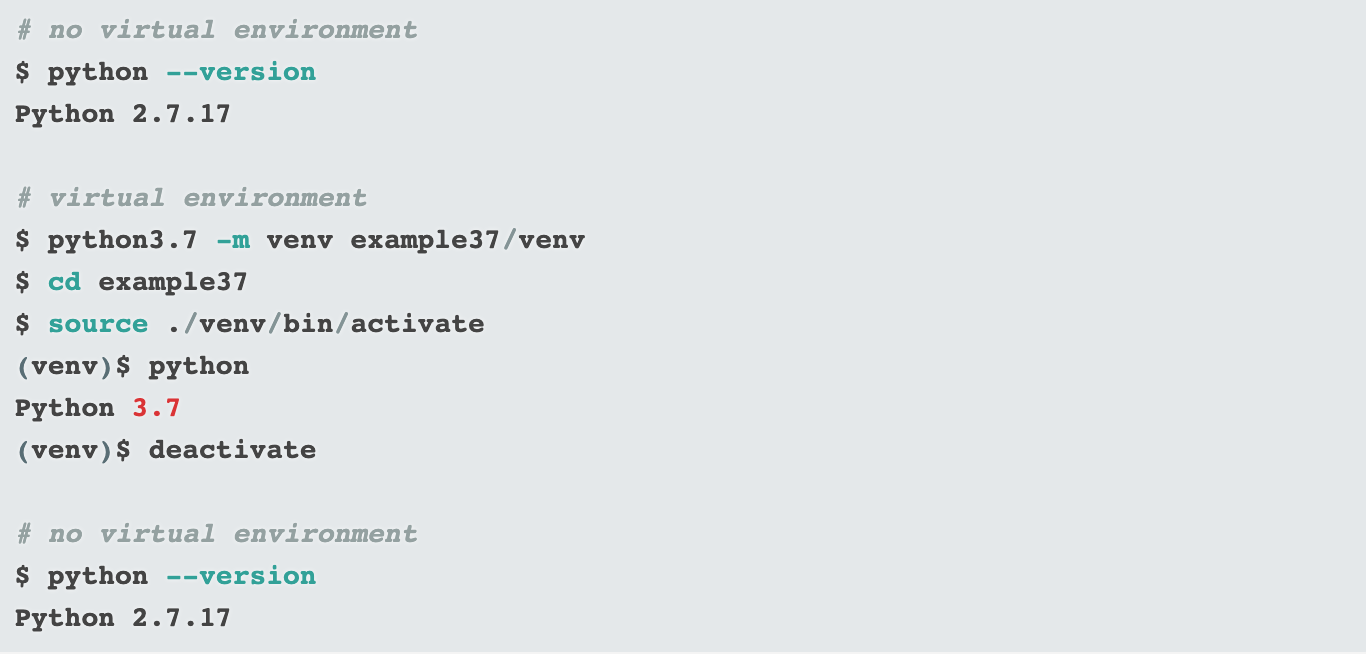
A virtual environment temporarily redirects calls to Python to a specific version of Python. For instance, using version Python 3.7 to create a virtual environment ensures that python points to Python 3.7, not Python 2.7 or Python 3.8 or whatever else you may have lying around on your development machine.

For example, here’s a virtual environment created with Python 3.7:
 

Using modules in a virtual environment

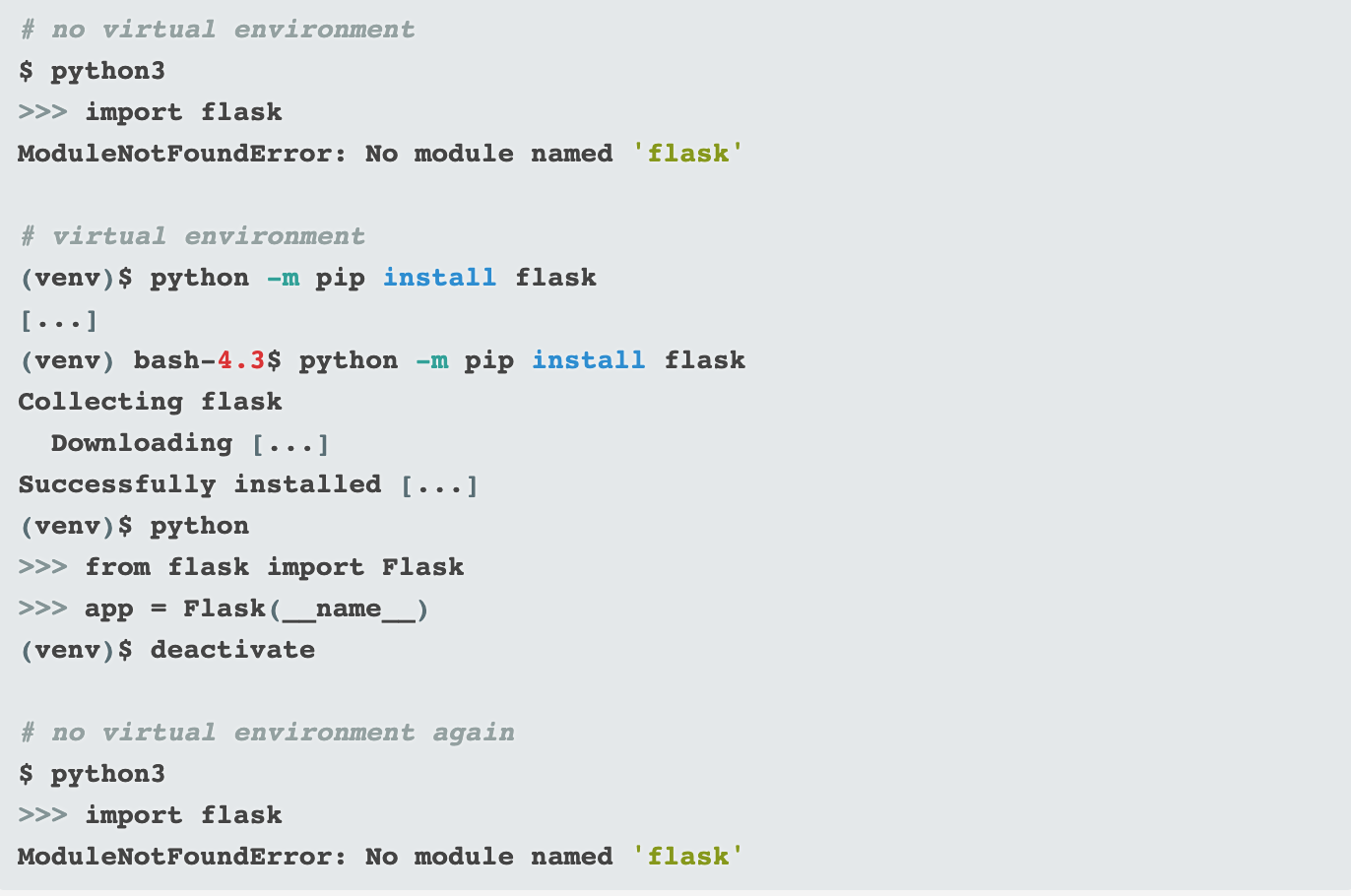
Modules are installed locally within the virtual environment. When you’re working in a virtual environment, you can install ExamplePyMod and use it all day long, but it will be gone once you leave the virtual environment.

Here’s the module installation process:
 

Restoring a virtual environment with pip

It might seem like a lot of extra work for you to install and reinstall your required modules every time you sit down to hack on code. Actually, the virtual environment system encourages you to keep track of the modules you’re using in a requirements.txt file within your project directory. You can process requirements.txt with pip to handle automated installs of all dependencies:
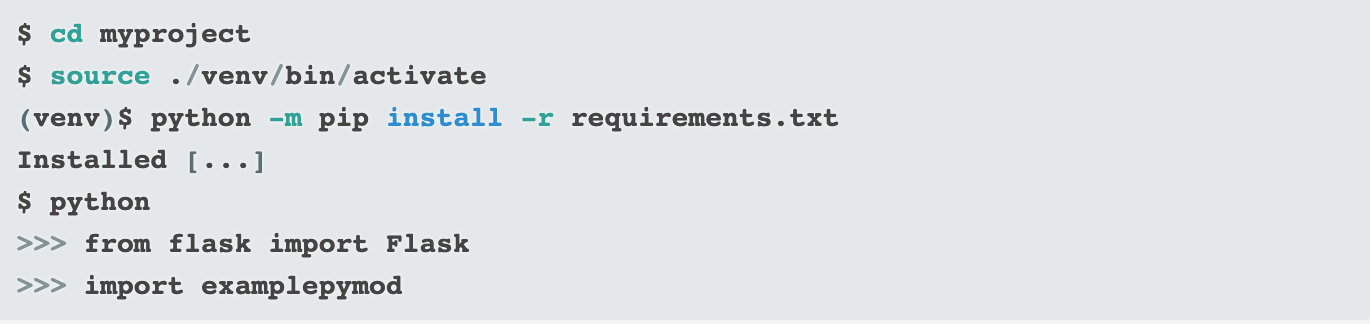
Python also caches required modules, so you’re up and running in no time.

For a complete overview of pip and its abilities, download Moshe Zadka’s pip cheatsheet.


Virtual environment overview

The command to create a virtual environment on Python is:

<span class="co4">$ </span>python <span class="re5">-m</span> venv <span class="sy0">/</span>directory<span class="sy0">/</span>venv

To activate a virtual environment:

$ source ./venv/bin/activate
(venv)$

To install required modules:

<span class="br0">(</span>venv<span class="br0">)</span>$ python <span class="re5">-m</span> pip <span class="kw2">install</span> <span class="re5">-r</span> requirements.txt

To deactivate a virtual environment:

<span class="br0">(</span>venv<span class="br0">)</span>$ deactivate

Virtual environments are an important part of the Python development process. Learn to use them to protect yourself and your users from unexpected and unwelcome surprises. In short, use virtual environments so you can spend more time coding and less time debugging!

Read More  Google I/O 2019 | Smart Home 101: How to Develop for the Connected Home


This article is republished from OpenSource by Seth Kenlon.


For enquiries, product placements, sponsorships, and collaborations, connect with us at [email protected]. We'd love to hear from you!

Our humans need coffee too! Your support is highly appreciated, thank you!

root

Related Topics
  • devops
  • programming languages
  • Python
  • Virtual environment
You May Also Like
Smartphone hero image
View Post
  • Gears
  • Tech

Zed Approves | Smartphones for Every Budget Range

  • January 29, 2026
Early Black Friday Gears
View Post
  • Tech

Friday Deals – And It’s Not Even Black Friday Yet

  • November 13, 2025
Users with laptops working with database. Data storage and organization, information access and management, big data protection concept. Vector isolated illustration.
View Post
  • Architecture
  • DevOps
  • Technology

What is application migration? Examples and best practices

  • August 18, 2025
aster-cloud-sms-pexels-tim-samuel-6697306
View Post
  • Programming
  • Software

Send SMS texts with Amazon’s SNS simple notification service

  • July 1, 2025
aster-cloud-website-pexels-goumbik-574069
View Post
  • Programming
  • Software

Host a static website on AWS with Amazon S3 and Route 53

  • June 27, 2025
Getting things done makes her feel amazing
View Post
  • Computing
  • Data
  • Featured
  • Learning
  • Tech
  • Technology

Nurturing Minds in the Digital Revolution

  • April 25, 2025
View Post
  • Tech

Deep dive into AI with Google Cloud’s global generative AI roadshow

  • February 18, 2025
Volvo Group: Confidently ahead at CES
View Post
  • Tech

Volvo Group: Confidently ahead at CES

  • January 8, 2025

Stay Connected!
LATEST
  • 1
    Synthetic data could ease people’s concerns about privacy breaches. But who gets to create it?
    • September 15, 2026
  • 2
    Apple Flagship Hardware Launch for September 2026
    • September 10, 2026
  • 3
    Multi-cloud with AWS and Azure just got a whole lot easier thanks to a new interconnect service
    • September 2, 2026
  • 4
    VMware targets ‘three core AI cost drivers’ with new Private AI Cloud service
    • September 2, 2026
  • Agentic AI is spurring a ‘fundamental shift’ in cloud infrastructure consumption
    • August 17, 2026
  • Why real SaaS resilience means breaking free of the hyperscaler
    • August 11, 2026
  • 7
    Digital sovereignty in the age of AI: You don’t have to choose between control and innovation
    • August 10, 2026
  • 8
    Broadcom eyes security, performance boosts with vDefend and Avi Load Balancer updates
    • August 7, 2026
  • 9
    IBM Study: One in Four Malicious Breaches are AI-Enabled, Costing Companies $6 Million on Average
    • July 29, 2026
  • 10
    Accelerating the frontiers of scientific discovery: Google’s $40M commitment to the Genesis Mission
    • July 26, 2026
about
Hello World!

We are aster.cloud. We’re created by programmers for programmers.

Our site aims to provide guides, programming tips, reviews, and interesting materials for tech people and those who want to learn in general.

We would like to hear from you.

If you have any feedback, enquiries, or sponsorship request, kindly reach out to us at:

[email protected]
Most Popular
  • 1
    3 Questions: Neural transparency and the future of AI design
    • July 17, 2026
  • 2
    Intel Invests €5 Billion to Expand Manufacturing in Europe
    • July 13, 2026
  • 3
    IBM and Red Hat Expand Lightwell with New Offerings to Build the Trust Infrastructure for AI-Era Open Source
    • July 8, 2026
  • 4
    When I Was Young
    • July 4, 2026
  • 5
    The Fastest AI Fried Chicken In The World
    • June 29, 2026
  • /
  • Technology
  • Tools
  • About
  • Contact Us

Input your search keywords and press Enter.