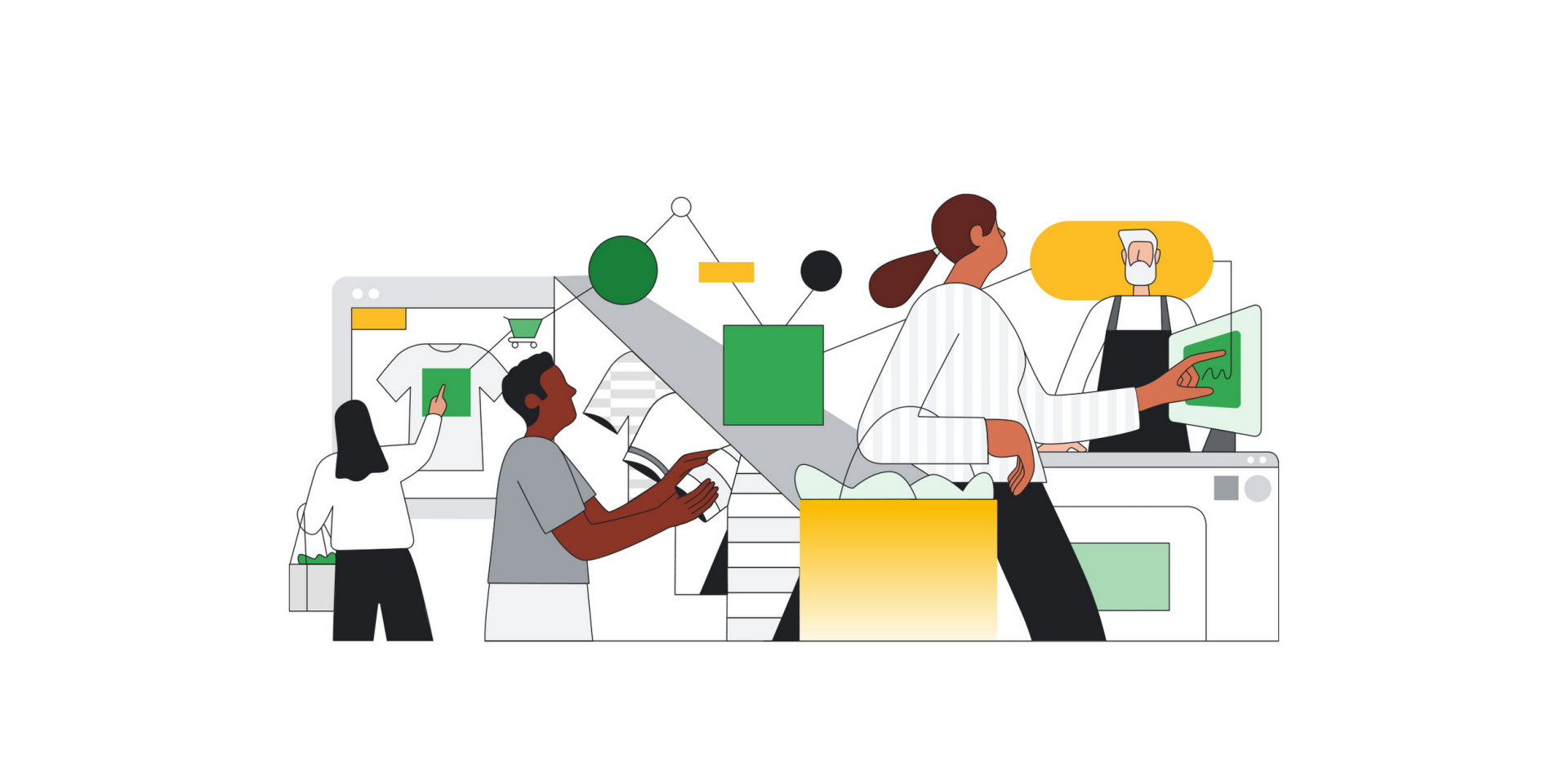
In today’s world, every penny counts, and saving money on supermarket spending is no exception. Have you ever wondered:
- How many packets of quinoa did you buy this year?
- How much have egg prices gone up?
- Why are grocery bills high in certain months?
- What’s the most expensive item you’ve ever bought at the supermarket?
This is the first part of a two-part blog series that demonstrates how simple it is to combine managed services on Google Cloud to create a complete application that digitizes your grocery receipts and analyzes your spending patterns using Google Cloud services. This architecture is useful for any number of use cases where you want to apply the power of document AI to fully event-driven processing pipelines.
From our partners:
In this first part of the blog series, we will discuss how to extract important information from your supermarket receipts, such as the date, store name, and items purchased, using Document AI. Storing this information in a Datastore allows you to access it quickly and easily. You can then use BigQuery to analyze the data and gain insights into your spending habits. This can help you identify areas where you can save money, such as by purchasing generic brands instead of name brands or buying in bulk. With this powerful combination of Google Cloud technologies, you can turn your receipts into a valuable data source that can help you save money and make smarter purchasing decisions.
Don’t let your grocery receipts go to waste – turn them into riches with Google Cloud!
Architecture:
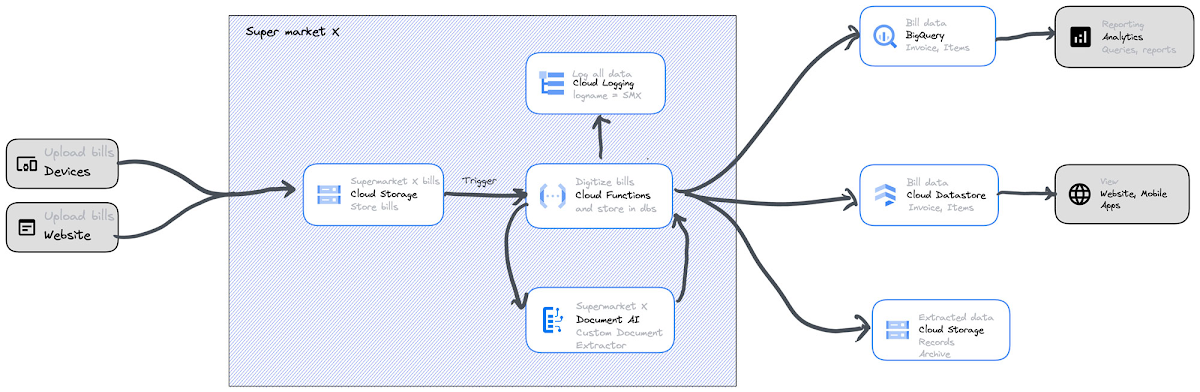
The following services will be used in this architecture:
- Document AI: Document AI is a cloud-based AI tool that extracts structured data from unstructured documents, automates tasks, and saves businesses time and money.
- Cloud Functions: Google Cloud Functions is a serverless compute platform for scalable, event-driven applications.
- BigQuery: BigQuery is a fast, easy-to-use, powerful serverless data warehouse for analyzing large amounts of data.
- Cloud Datastore: Cloud Datastore is a fully managed, scalable, high-performance, durable, and secure NoSQL database for web, mobile, IoT, and big data applications.
- Google Cloud Storage: Google Cloud Storage is a scalable, durable, and available object storage service for your data. It’s powerful, flexible, and cost-effective.
- Cloud Logging: Cloud Logging is a fully-managed log management service. It collects, stores, and analyzes log data from GCP and on-premises.
Here are the steps to build this service:
1. If you haven’t already, set up a Google Cloud account with Starter Checklist.
2. Set up Document AI Custom Document Extractor:
a. This guide describes how to use Document AI Workbench to create and train a Custom Document Extractor that processes any document.
b. Follow the same and create a custom processor that can process the invoice from your nearest supermarket that you visit most often (Document AI custom processors can support a wide range of languages). On average, we have observed ~15 receipts to train and to test each supermarket receipt model.
c. Processor schema should be as shown in the screenshot below. This schema covers all the information required on any supermarket bill, and most supermarket bills have these labels. Please note that if you change this schema, the code provided in step 4 below for Cloud Functions and BigQuery tables schema must be updated accordingly.
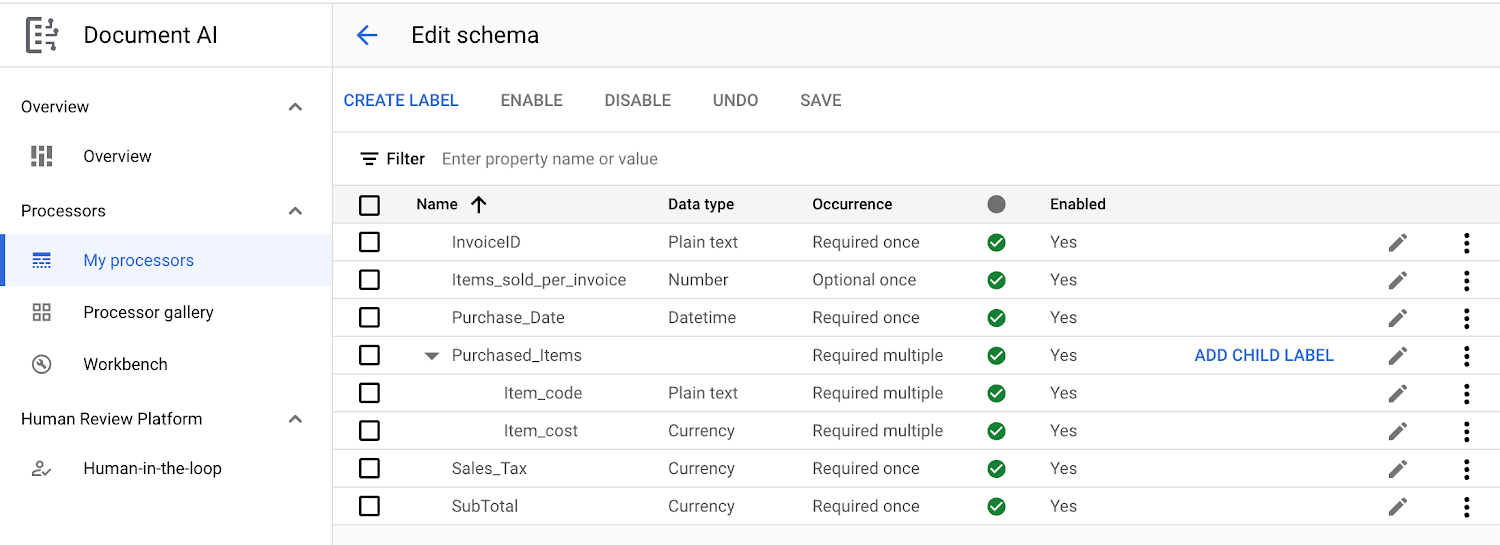
d. This Custom Document Extractor processor will be called within Cloud Functions to parse and identify any bill uploaded by the users via a web application or a phone application.
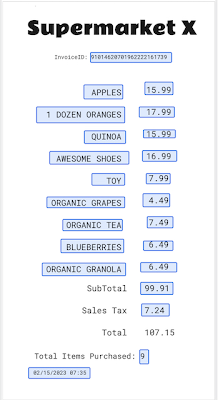
e. Here is a sample invoice used in this application. You can train on any invoice format as long as the schema in step 2 (c) above remains the same. The invoice should have an ID, items sold, date, items with their cost, sales tax, and subtotal.Here is an example of an invoice that follows this schema:
3. Set up Google Cloud Storage: Follow this documentation and create storage buckets to store uploaded bills.
4. Set up Google Cloud Function:
a. For instructions on how to create a second-generation Cloud Function with Eventarc trigger that will be activated when a new object is added to the cloud storage created in step 3, please see this documentation. Please note the following while creating a cloud function and adding Eventarc.
i. When creating the function, make sure that “Allow internal traffic and traffic from Cloud Load Balancing” is selected in the network settings.
ii. When adding an Eventarc trigger, choose the “google.cloud.storage.object.v1.finalized” event type.
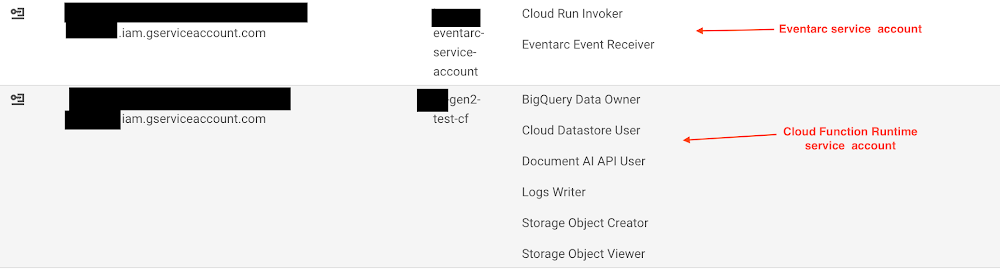
iii. It is recommended to create a new service account instead of using the “Default Compute Service Account” when creating Eventarc. The new service account should be granted the “Cloud Run Invoker” and “Eventarc Event Receiver” permissions.
iv. When creating a Cloud Function, do not use the “Default Compute Service Account” as the “Runtime service account”. Instead, create a new one and grant it the following roles to allow it to connect to DataStore, BigQuery, Logging, and Document AI: BigQuery Data Owner, Cloud Datastore User, Document AI API User, Logs Writer, Storage Object Creator, and Storage Object Viewer.
v. Once done, service accounts and permissions should appear as follows:
b. Next, open the Cloud Function you created and select .NET 6.0 as the runtime. This will allow you to write C# functions.
c. To ensure a successful build, replace the current code in the Cloud Function with this code, replacing the variables in the code with the appropriate Google Cloud service names. Replace content in HelloGcs.csproj and Function.cs files.
d. Deploy the Cloud Function.
e. This code creates two types (Kind) of entities, “Invoices” and “Items”, in Datastore. Please refer to this documentation for more information on Datastore.
f. This code also creates a new LogName under global scope. Please refer to this documentation for more information on creating custom log entries.
5. Set up BigQuery:
a. To create a new BigQuery dataset, please follow these instructions.
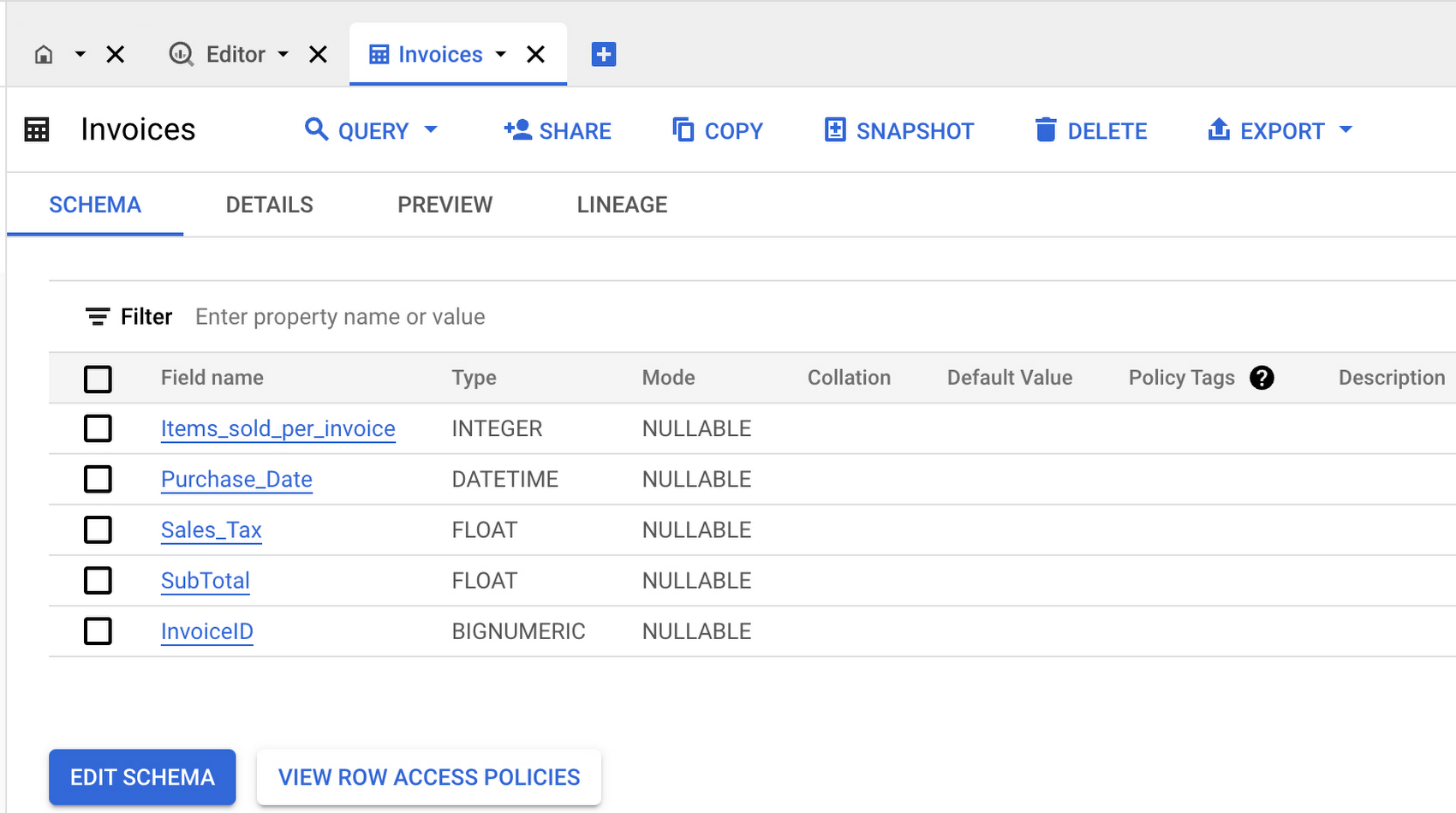
b. To create a new table called “Invoices” in the dataset created in step (a) above, follow the instructions in this documentation. In the Schema section and use the following JSON data as the “schema definition” for the “Invoices” table:
[
{
"name": "Items_sold_per_invoice",
"mode": "NULLABLE",
"type": "INTEGER",
"description": null,
"fields": []
},
{
"name": "Purchase_Date",
"mode": "NULLABLE",
"type": "DATETIME",
"description": null,
"fields": []
},
{
"name": "Sales_Tax",
"mode": "NULLABLE",
"type": "FLOAT",
"description": null,
"fields": []
},
{
"name": "SubTotal",
"mode": "NULLABLE",
"type": "FLOAT",
"description": null,
"fields": []
},
{
"name": "InvoiceID",
"mode": "NULLABLE",
"type": "BIGNUMERIC",
"description": null,
"fields": []
}
]
When finished, the “Invoices” table and its schema should resemble the following:
c. Please repeat the previous instructions, but this time create a new table called “Items.”
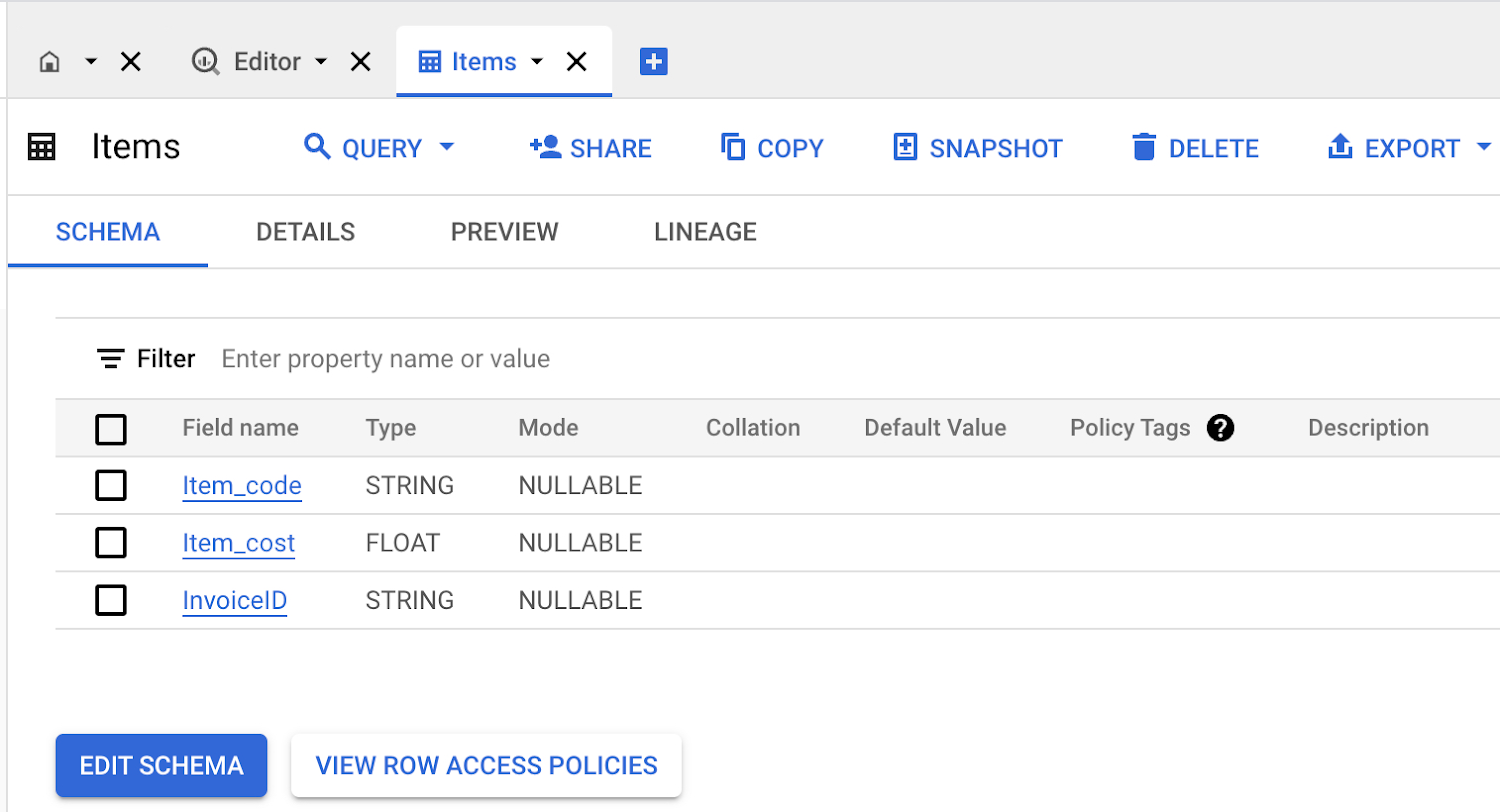
d. To create a new table called “Items” in the dataset created in step (a) above, follow the instructions in this documentation. In the Schema section and use the following JSON data as the “schema definition” for the “Items” table:
[
{
"name": "Item_code",
"mode": "NULLABLE",
"type": "STRING",
"description": null,
"fields": []
},
{
"name": "Item_cost",
"mode": "NULLABLE",
"type": "FLOAT",
"description": null,
"fields": []
},
{
"name": "InvoiceID",
"mode": "NULLABLE",
"type": "STRING",
"description": null,
"fields": []
}
]
When finished, the “Items” table and its schema should resemble the following:
6. Testing:
a. To test the application, upload the supermarket bill to the same cloud storage bucket that you created in step 3 and configured to “Receive events from” in Eventarc in step 4.
b. When a supermarket bill is uploaded to the blob storage, it triggers a cloud function that reads the file, processes it with a Document AI custom processor, extracts the relevant fields, and then stores the data in three different destinations: BQ tables (created in step 5 above), Datastore (two entities named “Invoices” and “Items” will be created), and a new text file per uploaded document with all extracted entities for archiving purposes.
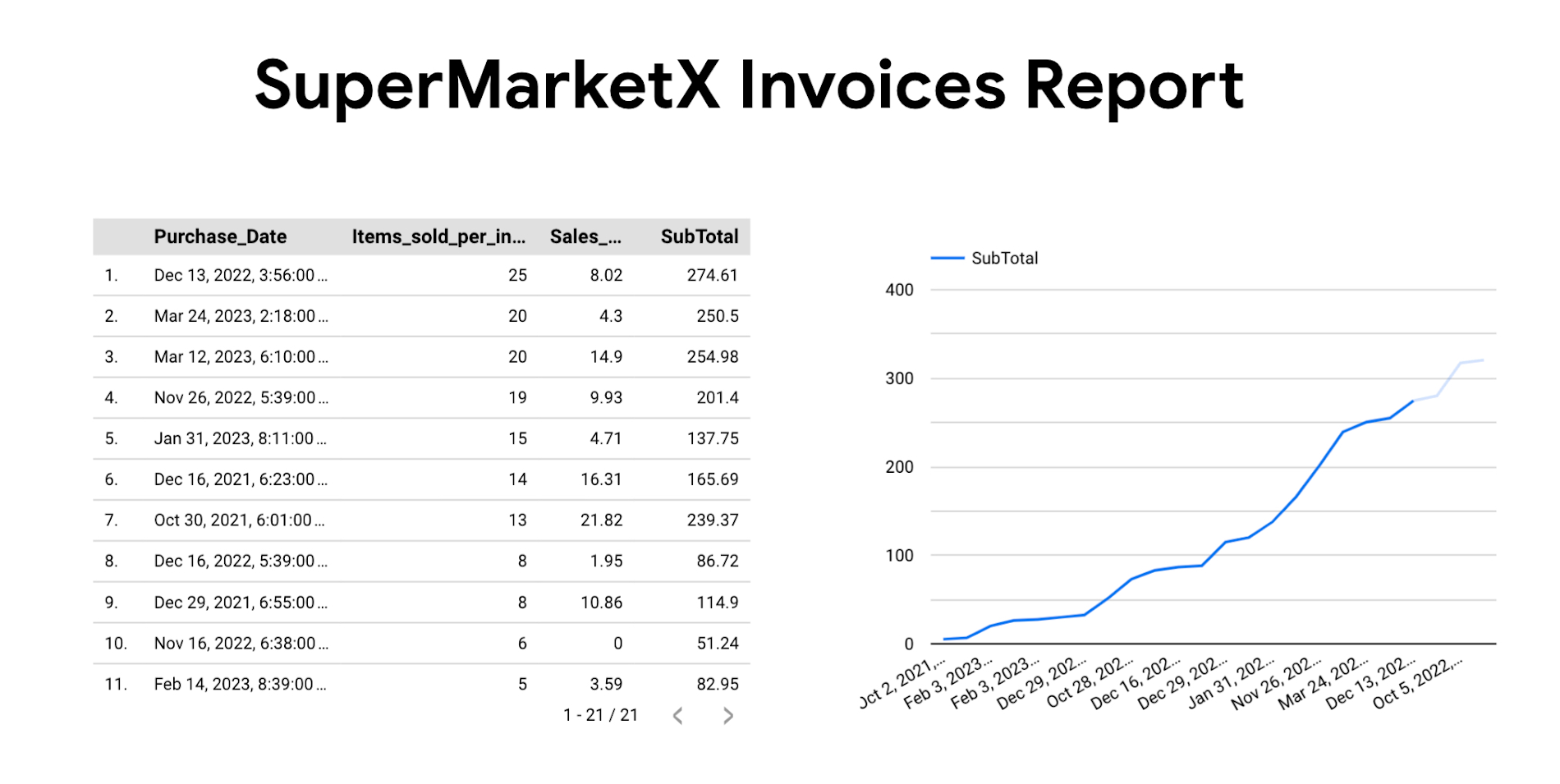
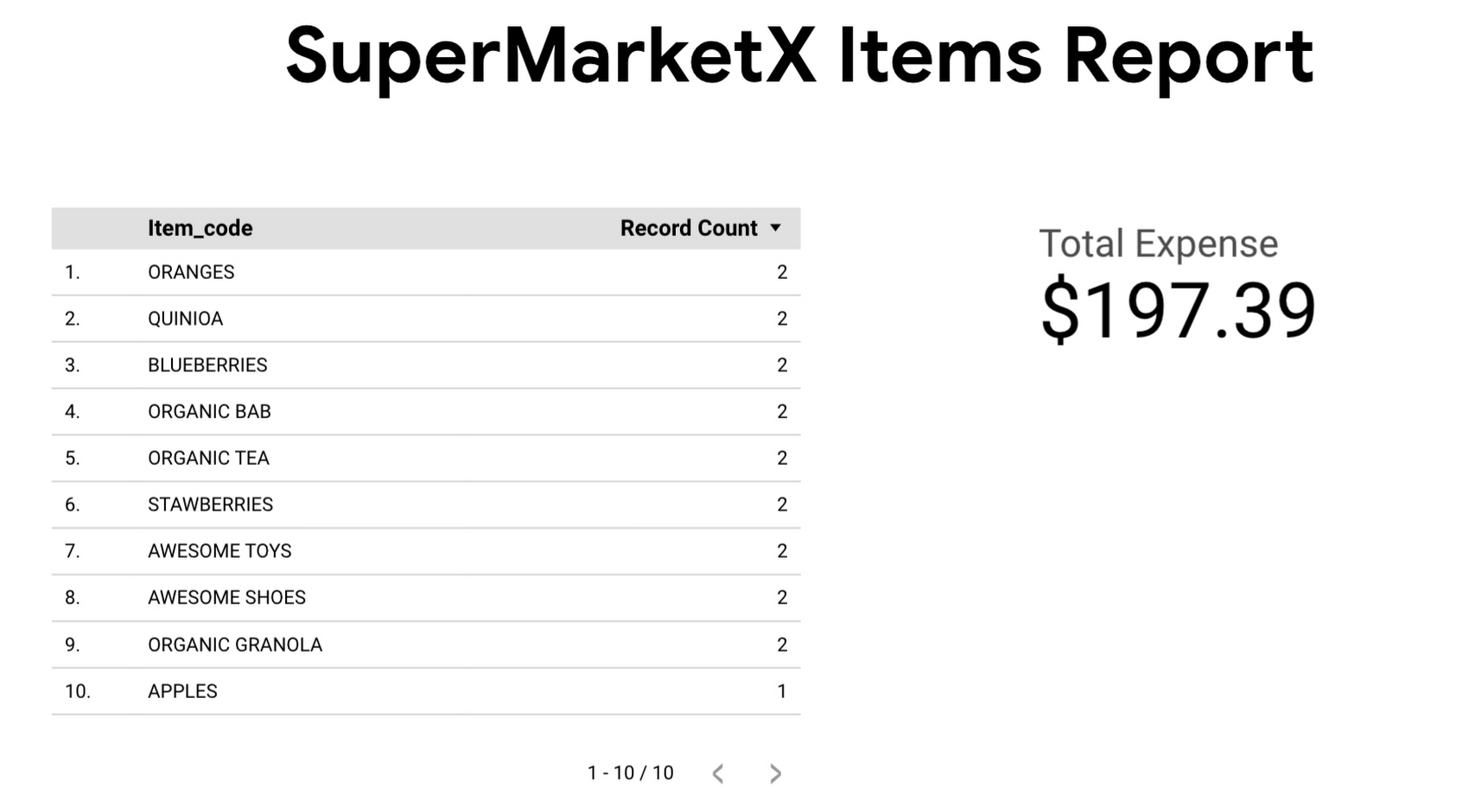
There are many ways to explore data in BigQuery, and one of them is to explore data in Looker from BigQuery tables. Here are some of the sample reports you can build with data:
Congratulations on digitizing your supermarket bills! You are one step closer to riches.
In the second part of this blog series, we will discuss how this architecture can be expanded to every supermarket bill in the market and how any supermarket bill can be digitized. So stay tuned!!
In the meantime, please review Google Cloud’s tutorials to learn more about the platform and how to use it effectively.
By Krishna Chytanya Ayyagari Senior Customer Engineer, Infrastructure
Originally published at Google Cloud
Source: Cyberpogo
For enquiries, product placements, sponsorships, and collaborations, connect with us at [email protected]. We'd love to hear from you!
Our humans need coffee too! Your support is highly appreciated, thank you!